Category: Math

1st Grade Counting by Tens
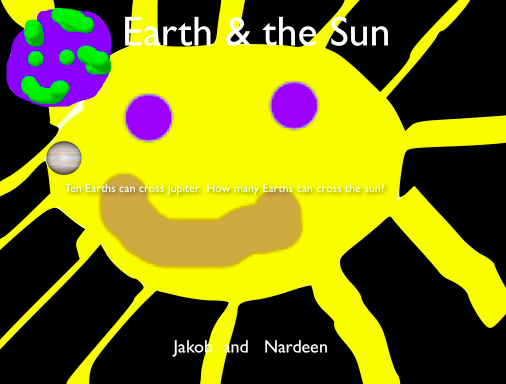
earthsunFirst grade students in Ms. Gerrard’s class at Davis Elementary have been learning how to county by tens to 100 in math (SOL1.2). They have also been studying about the Earth and sun in science (SOL1.6). So today we combined both topics into one lesson using Pixie & Keynote… a big task for first graders, but they were up for it! In my research I learned that the sun is about 870,000 miles in diameter and the Earth is about 8,000 miles in diameter, so about 100 (more like 110) Earths can cross the sun. But I wanted to find a unit they could use to count by tens, and I discovered that Jupiter is the perfect unit. It is about 87,000 miles in diameter. So about 10 Earths can cross Jupiter (more like 11) and 10 Jupiters can cross the sun. I created a Keynote template with most of the animations for this activity pre-built into it. You can click here to download it. I’ve done my work, now it’s time for the students to do their work. First they opened Pixie and, working with a partner, one drew a big picture of the sun and the other drew a picture of the Earth. We helped them take screenshots of their pictures and place them into their Keynotes. Next they added some transitions and animations using the Inspector. Finally they recorded their voices telling about how big the sun is and counting the Earths by tens to a hundred. You can see some student examples here: Mickaelly & Adin, Jakob & Nardeen.


5th Grade Multiplying Decimals

multiplyformulasFifth grade students in Ms. Bailey’s class at Davis Elementary have been learning how to multiply decimals by two-digit numbers using paper and pencil (and sometimes calculators). Today I showed them how to write formulas in a Numbers spreadsheet that will do the same thing. This activity helps them break up the process into logical steps so they can see how it all works together. First I gave them a template that you can download by clicking here. They typed in a number of their choice with a decimal (to the hundreds place) and another 2-digit number to multiply by. Next I showed them how to write the first couple of formulas to multiply the ones digit in the bottom factor by different digits in the top factor. Once they got the hang of it, they were able to complete the rest of the formulas on their own. Then we wrote formulas for multiplying the tens digit of the bottom factor by each digit in the top factor. It was a great review of place value and the distributive property! The next step was to add up all the products to get the final answer. Finally, we wrote a formula multiplying the two numbers to check if it equaled the sum of all the products of the individual digits. It really seemed to click with the students. The only problem was, when they wrote a new number, they would have to rewrite all the formulas. So afterwards I came up with another activity that you can download by clicking here. It breaks up any number they write into place value digits (that was hard to figure out!). Then they can write formulas that will work with any number.


Tags:


3rd Grade Pirate Maps

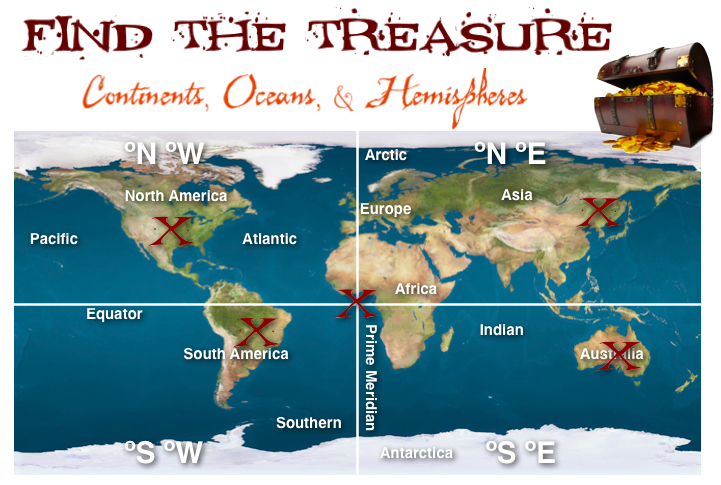
piratemapThird grade students in Ms. Ford’s class at Laburnum Elementary have been learning about the continents, oceans, and hemispheres (SOL3.5). So today we practiced finding and burying pirate treasures on various continents and oceans based on their hemispheres (really, using latitude and longitude lines). I gave them a template with a map and some questions that you can download by clicking here. First they had to label the continents and oceans on the map. Next we labeled the hemispheres by breaking them up into 4 quadrants: northeast, southeast, northwest, southwest. Now, using latitude and longitude coordinates we could figure out which quadrant we were in. I gave the students three treasures to find first. They entered the coordinates on iTouchMap and found where the treasures were located. Then they put a big red X on the spot. The next task was a little harder. I gave them coordinates that put the treasure in the ocean, but they had to adjust them to move the treasure to land. After testing a few numbers, the students figured out that the numbers get larger the farther away they are from the Equator or Prime Meridian and were finally able to place the treasure on land. For the last task, students could place the treasure anywhere they wanted, but they had to find the coordinates for the site and write it out as a question for a friend to solve. This activity adds a bit of math and problem solving to the continents, oceans, and hemispheres topic. Let me know if you’d like to try it out with your class!


Tags:


3rd Grade Rounding Calculator

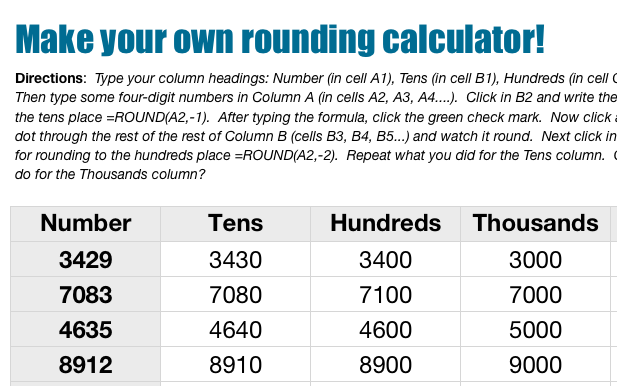
roundingcalcThird grade students in Ms. Wells’ class at Varina Elementary have been learning how to round numbers. I pointed out to them that their calculators can’t help with rounding because there is no rounding key. However, they can create their own rounding calculators using Numbers. I gave them a Numbers template that you can download by clicking here. The template guides the students through the process of creating formulas. The cool thing about teaching young children about formulas is it prepares them for the harder tasks of writing computer code and programming. It also gives students the opportunity to practice analysis and logical thinking skills because they have to figure out how to write the formulas and also how to debug the problems when they arise (which they inevitably do). First I explained how a spreadsheet is divided into columns and rows. Many 3rd graders are familiar with this concept because they learn about letter-number map grids (SOL3.5e). I instructed them to write any numbers they wish down column A. Next, in column B we wrote our first formula together to round any number to the tens place. I showed them how to drag the little white dot in the corner down the column to automatically fill in the other cells with the formula… and magically, all the numbers in Column A are rounded! You may think spreadsheets are boring, but when students see their formulas actually work, there is plenty of excitement! We do the formula for rounding to the hundreds place with a little less guidance from me. Finally they write the formula for rounding to the thousands place on their own.


2nd Grade Math Word Problems

sampleToday 2nd grade students in Ms. Ambrose’s class at Holladay Elementary created simple Pixie animations to show addition and subtraction word problems that they made up themselves. First they went to the Stickers library and selected a certain number of whichever object they wanted. That was their beginning number, and they added the number using the stamp tool. Then I told them to come up with a word problem where they either added to or subtracted from that number. We discussed different actions that would cause their number to increase (buying new objects, getting more as a gift, finding more, etc) or decrease (losing objects, selling objects, giving them away, etc). So there was a lot of student choice involved because not only did they pick their object, they also decided whether to add or subtract, and what was the reason for the change. Some of them were very creative, and that’s exactly what you want! Next we duplicated the picture (for the animation effect) and either added or subtracted the stickers. They also used the stamp tool to complete the math sentence (example 5 – 2). Finally, we duplicated the picture one last time and they got a friend to solve the problem. They recorded their voices and added their photos for each step of the animation and exported them together as a video. You can see two student videos here: DJ & Devon.


Tags:


5th Grade Graphing Latitude Temperatures

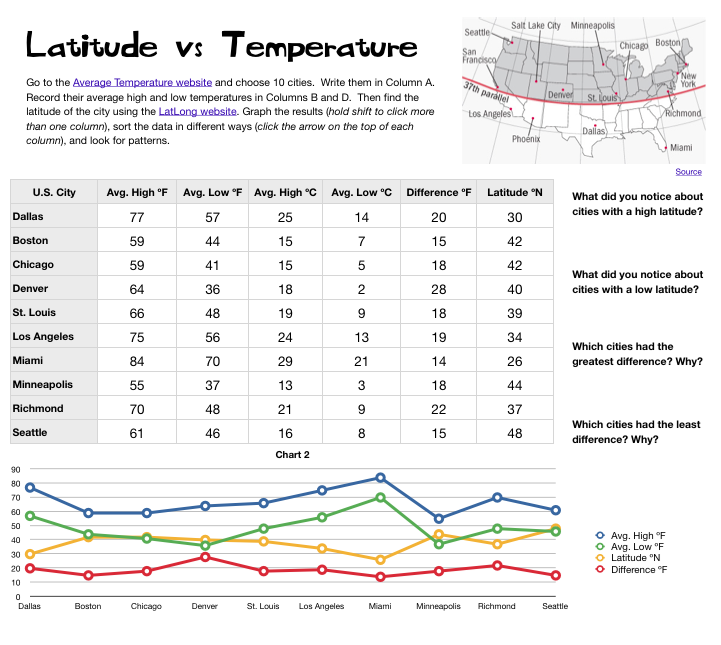
5th LatVsTemp PictureMs. Elsea at Davis Elementary had a great idea to challenge some of her math students. She wanted them to research the high and low temperatures of cities at different latitudes in the United States. Then she wanted them to compare the data, look for patterns, and try to infer reasons for the differences. So she asked me to help them with the graphing part. I created a Numbers template for them to use that you can download by clicking here. After students entered their data, I showed them how to graph it as a line graph. Even though a line graph is traditionally used for showing changes over time, it works well with this data since there were several things we were looking at and the relationships wouldn’t have been as obvious with a bar graph. Once we graphed the data, some relationships were very clear. As predicted, cities with the lowest latitudes had the highest temperatures. But one of the most surprising pieces of data was that cities in the mid-latitudes had the greatest differences between their high and low temperatures. We discussed possible reasons for that. Then we tried sorting the data in different ways. I showed them how they could click a column heading (like high temperature or latitude) to sort by that category. They were surprised how their graphs automatically changed as well. This lead to more interesting discussions. Overall, the students learned a lot about the relationship between latitudes and temperatures that they can take back to their classmates to share with them.


2nd Grade Math Strategies

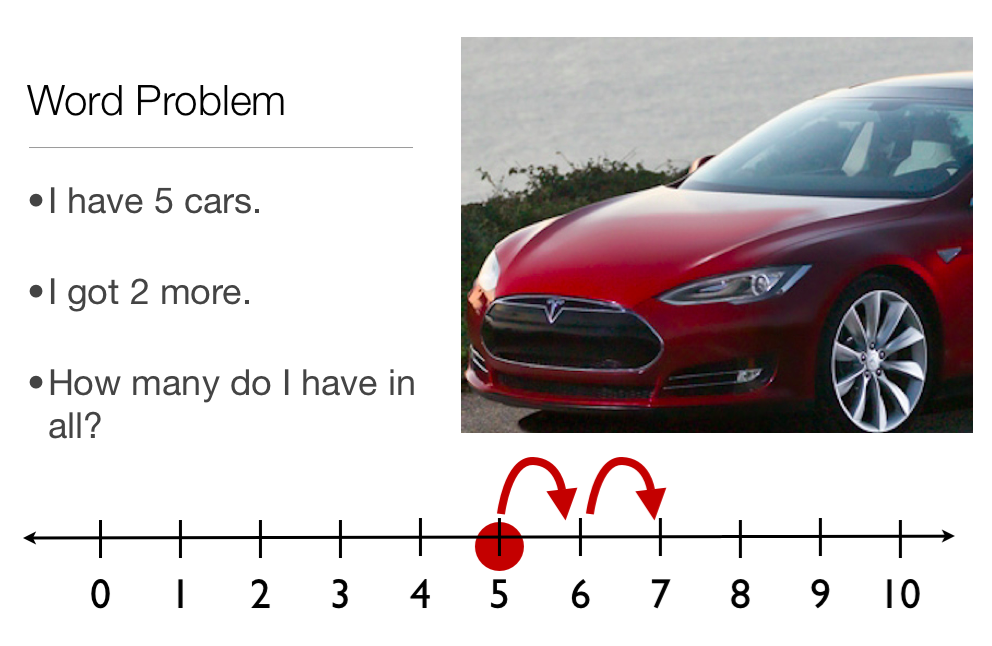
2ndstrategyMany students today are learning how to solve math problems by watching videos online, like those produced by the Khan Academy. But students can create their own videos demonstrating math strategies, and that’s what the 2nd graders at Laburnum Elementary did today. They wanted to show the “Counting Up” strategy for addition. So we opened a Keynote template that you can download by clicking here and wrote out an addition word problem. Each student made up their own problem and went online to get a picture for illustrating it. Next they went to the slide with the number line and illustrated the starting point and how to count up to the answer. On the final slide they wrote out the answer to their addition problem. The students could change the theme of the slideshow and add an ending. The last step was to record a voiceover explaining the problem and how to solve it using the math strategy. Take a look at a student example here.


Tags:


3rd Grade Rounding Raps

roundingrapThird graders in Ms. Collins’ class at Laburnum Elementary have been learning about rounding, and today she wanted me to teach them how to use Garage Band to create rounding rap videos. Even though Garage Band doesn’t have video producing functions, it gives students a way to create music quickly. So we used Garage Band to make the beats and then used Photo Booth to make the video. First the students divided themselves up into groups. I showed them how to open the loops browser in Garage Band and find a good beat that matched the rhythm of their raps. Then they practiced rapping to the beat, and some of the groups even choreographed some dance moves. Next we opened up Photo Booth, they selected a visual effect they liked, and they recorded their music videos. I posted a couple of them to Vimeo, take a look: Girls’ Rounding Rap, Boys’ Rounding Rap.


4th Grade Math Equation Animations

Screen shot 2013-12-08 at 1.37.41 PMFourth graders in Ms. Lara’s class at Holladay Elementary have been learning about simple math equations using addition, subtraction, multiplication, and division. So today we used ABCYa! Animate to illustrate some equations that they made up. First they decided which two different functions they wanted to include in their equation. Most picked either addition/subtraction or multiplication/division, but a few attempted a multiplication/addition relationship. They had to write the first number on the first page of the animation and add a picture from the clip art library (example, 3). On the next page they illustrated the second number (example, 3 + 2). On the following page they began the second half of their equation (example, 3 + 2 = 10), and on the last page they completed their equation (example, 3 + 2 = 10 – 5). They saved their completed animations as .gif files which I then embedded into a Google Doc that you can see here. I learned that in order for the animations to play correctly you have to link to the document and not the published webpage. You also need to host the .gif files online, so I have mine in my Dropbox Public folder. The nice thing about animated .gif files is that they can be embedded anywhere and usually load very quickly.


5th Grade Henrico Math Websites

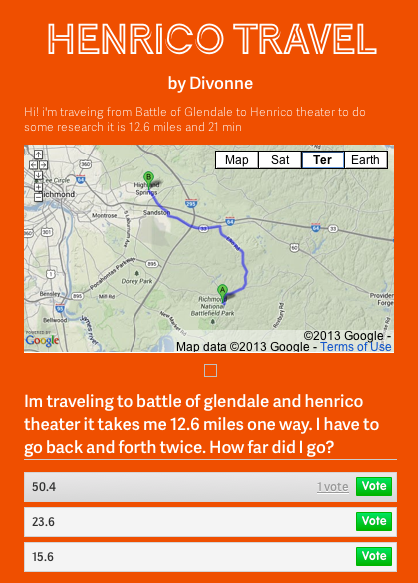
DivonneFifth grade students in Ms. Allen’s class at Laburnum Elementary have been learning about important places in Henrico County (HC.1). They have also been studying 2-digit multiplication in math. So today we combined the two topics into one lesson. First the students had to pick two famous places in Henrico County and use Google Maps to figure out the distance between them. Next we went to CheckThis and created a website with the embedded map and a word problem that involved multiplying the distance by a specific number. For example, a person might have to travel back and forth between the two places a certain number of times. Then the students created a poll question with various answers that visitors could choose. I posted all of their sites onto one page that you can see here. Students can answer each others’ questions to review multiplication as well as places in Henrico County.