
1st Grade Past & Present
Posted in 1st Grade, Social Studies
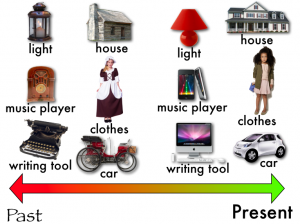 Today first graders at Trevvett worked on Keynotes about the Past and Present (SOL 1.1). I supplied them with a template to use including pictures of houses, clothing, lights, music players, cars, and writing tools from the past and the present. The students arranged them on the timeline in order, added special effects of their choice to each one, then recorded a voiceover for their final presentation. You can see a student sample by clicking here. You can download the template by clicking here.
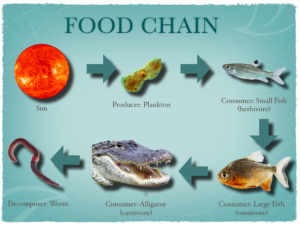 Fourth graders are currently studying food chains (SOL 4.5c) and Keynote animations are a great way to show the flow of energy from the sun to the producers, consumers, and finally to the decomposers. The fourth grade class I worked with knew a lot about Keynote already so I taught them a special feature that not many people know about, voiceovers, and it really improves the final project as you can see in
 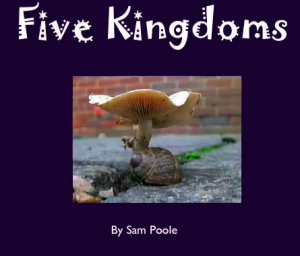 Fifth graders at Laburnum are studying the five kingdoms (SOL 5.5b) and they wanted to make Keynotes. But they have been using Keynote since second grade with me, so today I taught them a special feature they had never used before (and maybe you haven’t either). It’s called Smart Builds, and it’s the button that looks like a Magic Hat in the tool bar. It adds a very cool effect to pictures that you can check out by clicking
 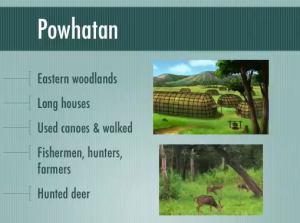 Second graders at Chamberlayne today worked on Keynotes about the American Indian tribes (SOL 2.2). I gave them a folder of pictures to use for each of the three groups (Powhattan-long houses, canoes, deer; Sioux-buffaloes, teepees, horses; Pueblo-multi-story terraced buildings, pottery). I also gave them a Keynote template to get them started. They added all the facts and selected two pictures for each slide. They could have gone on and added a musical sound track or their voice, but we didn’t get that far. You can take a look at a finished sample by clicking
 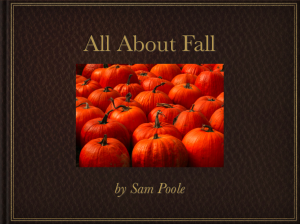 Last week I shared how first graders were working on Fall Pixies. This week, first graders at Trevvett wanted to try something different. So we made Fall Keynotes. Using SOL 1.7 as a guide, I gathered a folder of 75 fall pictures (acorns, leaves, pumpkins, frost, clothing, squirrels, ants, frogs, bees, and butterflies). Then I gave the students a Keynote template to get them started. It has a page for Weather, Plants, Animals, and People. Students had to write complete sentences on each slide and add a picture of their choice from the folder of pictures. Then I showed them how to add transitions. That’s one thing that makes Keynote special and different from Pixie, the animation element. The students love it! Take a look at a sample by clicking
  Today in Kindergarten at Holladay we made Keynotes about the Community Helpers. If you click
 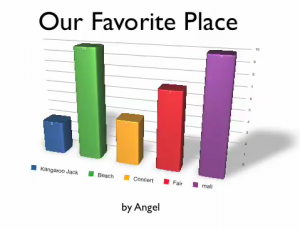 Fourth grade students at Laburnum had fun making animated 3-D graphs today using Numbers and Keynote. First they collected their data by asking each other a question, “What’s your favorite _____?” They used tally marks to keep track of the votes. Then they graphed the results using Numbers. I showed them how to use the Inspector to make the bars look like wood, metal, or marble. Next, they copied their graph over into Keynote and used the Build Inspector there to add a 3-D Grow Effect to their graph. The results were pretty impressive. Take a look at some of their favorite
  Third graders at Chamberlayne are creating Mystery Animal Keynotes. They chose an animal to research and are using the facts they find to create a type of “Guess Who?” game. I provided them with a folder of pictures to use, a Keynote template, and a robot that digitizes the picture of their animal to make it a mystery. Each slide in the slideshow gives a fact until you reach the last slide and the digitized picture fades into the real picture revealing the answer. If you’d like to see a sample, click
  Ms. Salmon, a 2nd grade teacher at Holladay had a great idea that I wanted to share with you. To keep parents entertained at back-to-school night or during parent conferences, you could have your students create quizzes for their parents to find out how much they really know about their children. Ms. Salmon instructed her students to take pictures of themselves in PhotoBooth, paste the pictures into a Keynote document, change the font and size of their name, and then write questions about themselves for their parents to answer. This gave the parents an opportunity to use the Mac computers and see what the Keynote program is all about. I took screenshots of some of the quizzes and put them together using a cool website called
  2nd Graders at Laburnum worked on different weather projects today. One class made Keynotes. I gave them a template and photos to use (which you can download