Category: Language Arts

5th Grade Science Review Comics
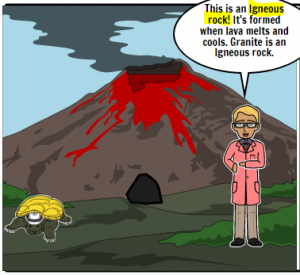
Fifth graders at Trevvett Elementary have been reviewing various science topics in preparation for Benchmark testing. A fun way to review is to make a comic study guide. Today students in Ms. Capano’s class used StoryboardThat to make comics about science topics of their choice. First, we reviewed the units they have been studying, such as rocks (SOL5.7), oceans (SOL5.6), and cells (SOL5.5). Then, they selected an idea they were interested in and went to StoryboardThat where they chose background scenes to best represent that topic. I showed them how they could use the “Edit Scene” button to change its weather or appearance. Next we clicked the Characters tab at the top and added people or animals. They could customize the characters as well by clicking the “Edit Pose” button. Finally, we added speech bubbles with the Textables tab. The students wrote complete sentences providing facts and information for review. Many of them even added bold or highlighted words, which they’ve learned are text features of nonfiction (SOL5.6a). In order to save and share our comics, we took screenshots and posted them to Schoology. You can see them all here.
2nd Grade Famous Americans eBook

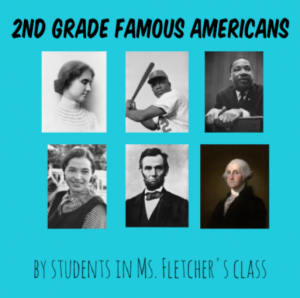
Second graders at Trevvett Elementary have been learning about famous Americans: George Washington, Abraham Lincoln, Susan B. Anthony, Helen Keller, Jackie Robinson, and Martin Luther King, Jr. (SOL2.11). Today, students in Ms. Fletcher’s class created an eBook (electronic book) about all of them. First, we reviewed the famous Americans, and they chose one whom they found most interesting. Then we spent about five minutes researching the person’s contributions. Students could use their notes, classroom posters, or a quick Google search to find relevant facts. Next, we logged into BookCreator using a class code. I showed them how to create a new book and customize the cover. We changed its color, typed a title (remembering to use uppercase letters), and added a photo of the person using the built-in Google image safe search. On the following page we recorded a video of ourselves telling about the famous American’s accomplishments. Although video is a fantastic feature of eBooks, I’ve found that it doesn’t work well in BookCreator. The videos just seem to load and load and load… and never play. Be aware of that issue if you try it with your class. On the last page we typed a complete sentence about our person and used the drawing tools to draw a picture of them. Finally, I combined all the students’ individual books together into one big book. You can read it here. Be sure to check out BookCreator’s newest feature, “Read Aloud.” When you press the button, a computerized voice will read the book aloud. It’s a great way for students to recognize spelling and grammar mistakes.


3rd Grade Measurement Books

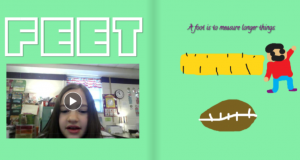
Third graders at Holladay Elementary have been learning about U.S. Customary and Metric units of measurement for length, capacity, and mass (SOL3.9). Today, students in Ms. Whittaker’s class created their own interactive measurement ebook. First we reviewed the different units and each student selected one. We tried to make sure that most of the units were chosen and that there weren’t too many duplicates. Next, we signed into BookCreator with the teacher’s class code. On the first page each student typed the name of their unit and drew a picture of it with the drawing tools. On the second page, they typed a sentence explaining what kinds of things are measured with that unit–big things, little things, light things, heavy things, liquids, etc. We also recorded a video, but those had problems loading, so next time I would probably just add a photo. On the last page students used the built-in image search to add photos of objects that could be measured with the unit. When they finished, the teacher combined the individual student chapters into one book that you can read here. (UPDATE: I taught a similar lesson to Ms. Cathcart’s class at Varina, and you can read their book here).


Tags:


2nd Grade Seasonal Adaptations Comics

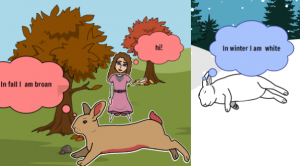
Second graders at Trevvett Elementary have been learning about ways that animals adapt to the changing seasons (camouflage, hibernation, migration, etc.)(SOL2.7a). Today students in Ms. Myers’ class created comics showing an animal of their choice adapting to the fall, winter, and spring. First we discussed different types of animals and what they do in winter. I demonstrated how to do a Google search if they didn’t know what their animal does. For example, I asked Google, “What to ladybugs do in winter?” (ANSWER: They hibernate in groups). Once we had our information, we went to StoryboardThat to make our comics. Since there are three panels in the comic, we made the first one fall, the second one winter, and the third one spring. The students dragged down scenes to represent their animal’s habitat. I showed them how to click the blue “Edit Scene” button to change the weather for the seasons. Next we clicked the Characters tab and went to Animals to find our animal. The Animals have an “Edit Pose” button that could be used to put the animal into different positions and change its colors. Finally we added “Textables,” or speech bubbles, with complete sentences explaining what the animals do to adapt to the different seasons. To save our comics, we took a screenshot using the Snipping Tool, then posted them to Schoology. You can see them all here.

Tags:


5th Grade 3-D Cell Models

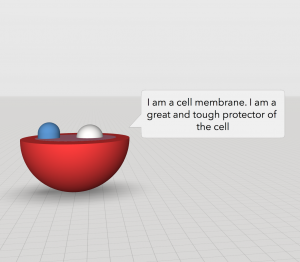
Fifth graders at Varina Elementary have been learning about cells and their different parts in Science (SOL5.5a), and they have been learning how to use adjectives and adverbs in English (SOL5.8b). Today, students in Mr. Williams’ class created 3-D models of cells and wrote descriptive sentences of some of the parts using adjectives and adverbs. We used a great site called CoSpaces to create the 3-D models. First, we logged in using our Google accounts, and I showed them how to pick a background from the Environment tab. Next, we clicked the Library and built a model of a plant or animal cell using the cubes, spheres, and other shapes from the Library. We right clicked on each shape to change its color and activate it for use in Blockly (the coding language). Finally, we used blocks of code to program the cell parts to identify themselves when clicked. The students typed sentences with adverbs and adjectives describing each part’s function. You can see them all here. (UPDATE: I taught this lesson in a couple of other classes as well, so I’ve included some student samples from those lessons on the document. In one class we made the cell parts actually speak by recording ourselves in Vocaroo and uploading the MP3 audio files to CoSpaces).


Tags:


5th Grade Southeastern State or Animal Websites

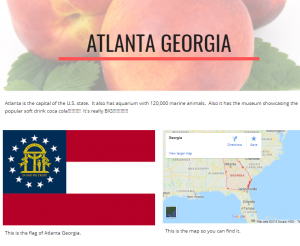
Fifth graders at Laburnum Elementary have been studying the southeastern states in History (SOLSE), and they have been learning about animal survival traits in Science (SOL5.5c). Today students in Ms. Hall’s class chose a southeastern state or an animal to research, and then shared their findings on a Google website. First I explained how to research their topic using books or the Internet. We discussed the importance of checking facts (seeing if the fact was repeated in multiple sources) and using reliable websites. I instructed them to find the answers to three questions they were curious about–like “What is the coolest place to visit in the state?” or “What is the most amazing survival trick of this animal?” Once our research was complete, we went to Google Drive and clicked New > More > Google Sites to create a website. I showed the students how to pick a theme, and how to use the buttons to add different features to their websites. Besides including their three facts, I also wanted them to include a header image, a photo, and a map. When our websites were finished, we published them and copied the links into Schoology. You can see them all here.


4th Grade Measurement Comics

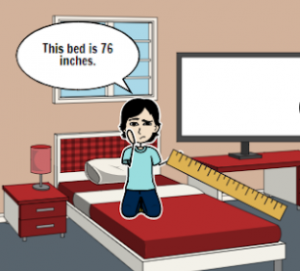
Fourth graders at Holladay Elementary have been learning about measurement in Math (weight SOL4.6, length SOL4.7, and liquid capcity SOL4.8). Today, students in Ms. Truda’s class researched some measurements and created measurement comics using StoryboardThat. First, we reviewed the different customary and metric units. I explained that they could pick one or more things they were curious about and research its measurements. I asked them if one thing could have more than one measurement? For example, how many different measurements would a couch have? (Answer: four – length, width, height, and weight). If the object they chose was something in the classroom, they could actually measure it, but if it was outside the classroom, they could ask Google for its measurements. I demonstrated how to use the microphone on a Google search page to ask a question like, “How tall is a giraffe?” Once they had their measurements, they made their comics on StoryboardThat. StoryboardThat has an amazing collection of clip art, so with a bit of creativity (and use of the search box), students were able to find all the backgrounds and characters they needed to show their measurements. We took screenshots of our comics and posted them to a Schoology album. You can see them all here.


Tags:


2nd Grade American Indian Homophones

Second graders at Holladay Elementary have been learning about American Indians in History (SOL2.2) and homophones in English (SOL2.7a). Today, students in Ms. Fournier’s class chose an Indian tribe (Powhatan, Lakota, or Pueblo) and thought of homophones that they might say (if they spoke English). First, we opened Pixie and used the paint brush and paint bucket tools to draw the correct environment for the tribe we selected (woods for Powhattan, plains for Lakota, desert for Pueblo). Next, we used Stickers to add examples of people, animals, houses, and tools to represent the tribe. Before we wrote the homophone sentence, we brainstormed a list of possible homophones to use. Then the students chose a homophone pair to include in a sentence about their tribe. We exported the images as JPG files and shared them in a Schoology album. You can see a few student examples here.


Tags:


5th Grade Coding Character Traits

Fifth graders at Trevvett Elementary have been learning about character traits and making inferences (SOL 5.5b,i). Today students in Ms. Brown’s class created 3-D scenes where the viewer has to make inferences about the character traits based on what the character does and says. First, we discussed how to show (but not tell) character traits in a story. How can we show that a character is compassionate? short-tempered? clumsy? brave? deceitful? I explained that they would use code to animate a 3-D model, revealing one character trait. We brainstormed a list of traits, and they chose one they wanted to show. Next, we signed into CoSpaces with our Google accounts and created a new scene. I showed them how to click the Environment button at the bottom and select one of the built-in backgrounds. Then we clicked on the Library button and added people and objects to the scene. I demonstrated how to use the buttons that appear above each object to resize, raise/lower, and rotate it. Right clicking on an object reveals a menu for customizing its color and activating it for use in the Blockly code. Finally, we clicked the Code button at the top and added bits of code to make it move and speak and interact with other objects. We published our projects with the Share button and pasted the links to Schoology with a question about the character traits for our classmates to answer. You can see all their projects and questions here.


Tags:


5th Grade Coding Causes & Effects

Fifth graders at Holladay Elementary have been learning about cause-effect relationships (SOL5.5j). Today students in Ms. Neal’s class illustrated cause-effect relationships with animations created in Scratch. First, we brainstormed ideas of different situations that clearly show causality: accidents, sicknesses, successes, failures, surprises, etc. Next, the students logged into their Scratch accounts and created a new activity. I showed them how to add additional sprites and change their costumes. We wanted the costumes to reflect the cause-effect relationships. For example, if the milk spoiled, one costume would show good fresh milk, and the other costume would show green rotten milk. The person drinking it could have two costumes as well, one with a happy face and one with a disgusted face. In order to build the animation, we used the codes for Motion, Looks, and Control. Each sprite had its own code telling it when and how to move. The code also programmed the sprites to “say” things and change their costumes at specific times. One of the great features of Scratch, is that every project has a “Look Inside” button that you can click to see the code. Take a look at all of their projects here.


Tags: