Category: 4th Grade

4th Grade Solar System Comic Books

The solar system is an exciting new SOL for fourth grade (4.7, 4.8). There are lots of cool projects that you can do. Fourth grade students at Chamberlayne Elementary School made online comic books today. Pairs chose an object in the solar system to research. I have created a site of kid-friendly links for learning more about the solar system here. I also made a quick Keynote animation here. Then I showed them how to create a page in Comic Life. I gave them a template and a folder of pictures to use that you can download by clicking the links. They created their comic, then I combined all of them into a Pages document, saved it as a PDF (go to File > Print > Save As PDF), and uploaded it to Youblisher which automatically turns it into a cool flip book! I have embedded one below, but you can see each class’s books: Filer, Albis, Hand, Covington.

4th Grade Planet Pixie

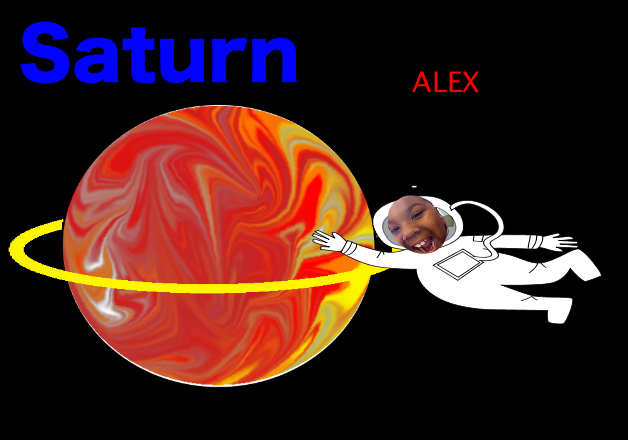
Today at Laburnum Elementary 4th graders shared what they have learned about the planets of the solar system (SOL4.7). They have been using Pixie a lot so I wanted to show them some of the more advanced features of this cool program. To create the planet, first we researched to make sure we got the colors right. Many of the gas giants have swirls of color, so I showed them how to use the Smudge Tool to smear the colors around. Once they had the colors right I showed them how to use the selection tool to cut a perfect circle out of their smeared colors and erase the rest. Some of the planets also have rings so I showed them how to take the circle tool to make a smashed circle, glue it down, and erase the backside so it would look like it went behind the back side of the planet. Then we turned it into a sticker so we could drag it on top of the planet. Next we added a spaceman sticker and put their photo inside the mask. Finally I showed them how to record their voices to explain the facts about their planet. You can see a few students samples by clicking here.


4th Data Collection & Graphing with Google Docs

Today 4th graders at Laburnum collected data from their classmates and graphed it using Google Docs. First we decided what we wanted to know about our classmates. We wanted it to be useful and authentic. So for example, one student noticed that his friends were sleepy, so he wanted to find out what time they go to bed. Another student wanted to know what problem her friends struggled most with at school. Others wanted to plan the next team game for recess or find out what treats the teacher should bring in for an upcoming class reward. Once we chose our question, I showed them how to create a form in Google Docs. I also showed them how they could change the theme to make it relate to their topic. Next students traveled around the room filling out each others’ forms. So everyone had plenty of data. I showed them how to look at all their data in the Google spreadsheet and how to sort it in a variety of ways. We sorted it by the question answer so they would be grouped together for easy counting. They counted the different answers and graphed them for the last step. You can take a look at some sample forms with the accompanying data/graphs below:
Stephany – What’s Your Favorite Candy? (data & graph)
Sedbreion – What Time Do You Go To Bed? (data & graph)
Precious – What Are You Having Trouble In School? (data & graph)


Summer School 2011 “Lights, Camera, Action!”

During the week of July 25-28 I taught a summer school class at Springfield Elementary called “Lights, Camera, Action!” I had rising 4th and 5th graders and our goal was to create educational videos for teachers to use in their classrooms about different famous people. Students chose to work with a partner or solo, and they selected a famous person to research. They created all the parts of the video themselves, including the animations and music, using software on the computer (Photo Booth for the interview/green screen, Keynote for animations, Google Earth for satellite imagery, and iMovie for video editing) as well as web tools (SitePal for voiceovers, Aviary Education for soundtracks, Screencast-O-Matic for recording, and Blabberize for the “talking heads”). You can see my sample below and take a look at all the student samples on this website. Be sure to leave a comment on the videos to let my summer school students know what you think of their projects!

Woodrow Wilson from Henrico Students on Vimeo.


4th Grade Google Forms & Databases

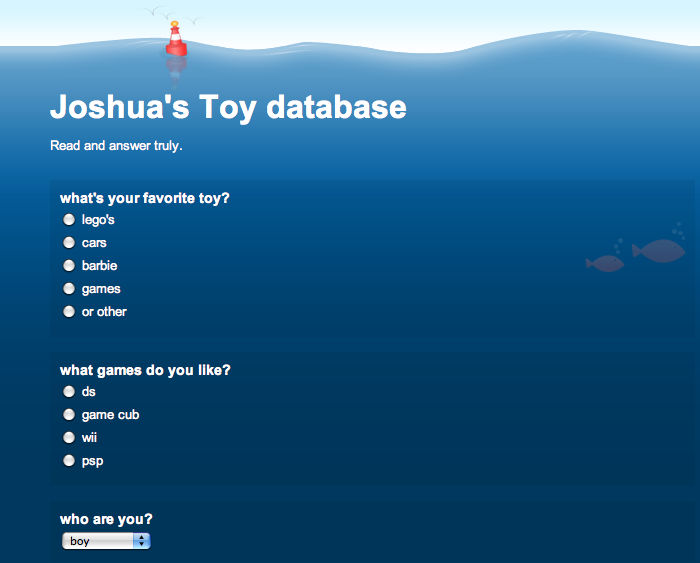
The database technology requirement often presents a quandary for teachers because we don’t have a database program per se on the computers anymore. However, a database is really just a collection of data that is organized into different categories, much like a spreadsheet. The key elements of a database are that it usually includes a form for entering the data, and the data can be sorted and filtered to show you exactly the information you want. So your students CAN make a database using Google Forms. That’s what we did today in Ms. Filer’s 4th grade class at Holladay Elementary. After building a sample form with the students, I showed them how to create their own form. Each student chose a topic of his or her interest, built the form using a variety of question types, and then travelled around the room filling out their friends’ forms. Next I showed them how they could access their data in Google Docs and sort and filter it. You can take a look at some students’ forms by clicking on the names below (and go ahead and fill out a couple if you want… the students will love it!)
Alex’s Pet Database
Skylar’s Field Trip Database
Joshua’s Toy Database
Emma’s Favorite Singer Database
Andrew’s Best SOL Test Database


4th Grade Student-Created Website

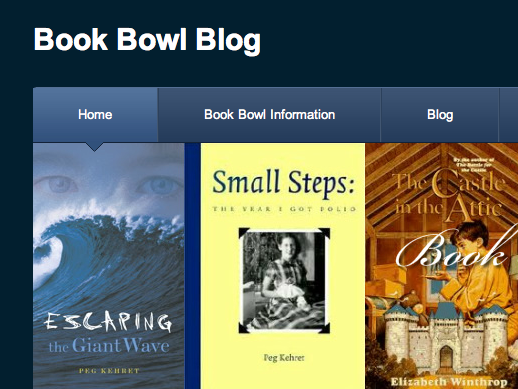
One of the great things about teaching your students to use web tools is that they can use them at home… and many students are very motivated to do just that! I recently showed Mr. Stein’s class at Pinchbeck Elementary how to create websites using Weebly. Today, one of his students, Andrew, came to me proudly showing a website he had created on his own time for the school’s Book Bowl. I was really impressed with all the features he included: a poll, a blog with comments, an embedded slideshow and maps, a downloadable file, and more! Click here to take a look at it (be sure to leave a comment 🙂 [Update: He has continued working on it over the summer. I was showing it off at a teachers’ conference in Philadelphia and I noticed that he had added to it on his vacation… now that’s a motivated student!] If you’d like your students to learn how to create their own websites with Weebly, let me know. You can check out other student Weebly sites on this post.


4th Grade Moon Phases Websites

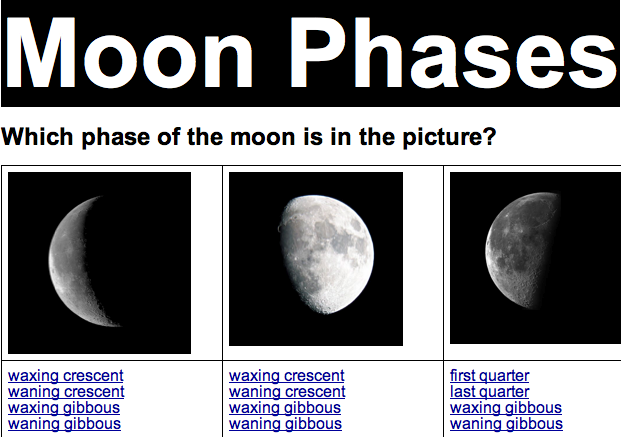
Today fourth grade students at Laburnum Elementary created interactive websites about the phases of the moon using GoogleDocs (SOL4.7b). Each student had to create a multiple choice question about a phase of the moon and make a response so when visitors clicked on an answer they would be taken to a message letting them know if they were right or wrong. I gave them a folder of pictures to use with phases of the moon and happy and sad faces. You can download it by clicking here. Then I taught them how to make the bookmarks and links using a sample website that you can see here. Check out some student examples: Asma, Charles, Milan, Monica, Ramar. Finally, be sure to take a look at my moon website for games and links about the moon.


Famous Americans Comic Life

Many classes are studying famous Americans right now, and some grades have new people this year (Eleanor Roosevelt in 1st, Cesar Chavez in 3rd, and Jack Jouett in 4th, to name a couple). A great way to review these people and their accomplishments is to create a comic about them. You can download a template to use here. It was created for 3rd grade, but you can easily adapt it for other grades by changing the names. I gave each grade a folder of pictures to use. Click on the grade to download that folder of pictures: Kindergarten, 1st, 2nd, 3rd, 4th. In Comic Life you can navigate right to the folder of pictures using the Finder button. Students drag the picture to the correct spot in the comic, change the style of it if they want, then write important information about the person in the speech bubble. They can also add their own picture using the webcam feature and tell how they plan on making a contribution like these people did. You can see an example by clicking the photo.


4th Graders Blogging!

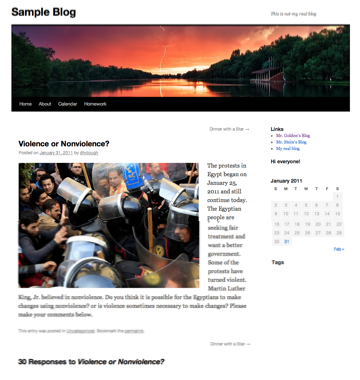
Today 4th graders at Chamberlayne Elementary started blogging. Your class can start too! Each Henrico teacher has a blog space on http://blogs.henrico.k12.va.us Just log in with your email name and password and start posting! I can show you how if you have questions, or I can teach a lesson in your class like I did today. If you would like some ideas about what to post, BrainPop has a nice guide here. The protests in Egypt are a current topic in the news, so I posted a question about it for students to comment on to give them practice. You can see the post and comments by clicking here. Before your students start making comments though, it’s very important to go over the rules and guidelines. You can make up your own, but here are a few to get you started (borrowed from here and here):

1. Use first names only – do not reveal personal information (that includes parents posting).
2. Stay on the topic of the original post – don’t say hi, or comment on something unrelated in someone else’s comment.
3. Proofread before submitting – check punctuation and spelling. Remember this is published online for anyone in the world to see.
4. Write in full sentences and words – no “text” talk.
5. Make a point – Don’t just say, “Great job,” “I agree,” or “You’re wrong,” explain why. Be sure your contribution to the discussion is meaningful.
6. Be respectful – Do not make comments that are unkind, impolite, or rude. Those comments will not be approved anyway, and you may lose the privilege to post comments in the future.

For more information about starting your own Henrico blog click here.


Tags:


4th Grade People Groups

Today fourth graders at Laburnum Elementary created maps showing where the different people groups settled in Virginia (VS.4b). The maps could have been created with Pixie or even Google Maps, but since this class hadn’t used Comic Life yet, I wanted to show them how to use that program. So I gave them a template and some clip art to use that you can download by clicking here. They dragged the clipart onto the template, placing the American Indians, the English, and the African Americans in the correct places on the map of Virginia. Then using speech bubbles the students identified the various people groups and the regions where they primarily settled. You can try an interactive version of this activity on the Virginia Trekkers website.