Category: 3rd Grade

3rd Grade Animated Food Chains

CaptureThird graders at Holladay Elementary have been learning about aquatic and terrestrial food chains in Science (SOL3.5), so today students in Ms. Middleton’s class created animated food chains using Google Slides. First I posted a blank template to Google classroom and set it up to make a copy for each student. We discussed the different habitats they have learned about (rainforest, grasslands, desert, ocean, etc), and I told them to chose one for their food chain diagram. On the first slide, the students clicked the background button and chose an image of their habitat. Then we added the title and their name. I showed them how to change the font, size, and color so it showed up well on the background image. On the second slide we added a sun shape by clicking the Shapes button and changing the fill and outline colors. We double-clicked inside the shape and typed the word “Sun.” Next I showed them how to add the other plants and animals by clicking the Image button and doing a Google search. Under each animal or plant the students added a text box label. We also added curved connectors (Line > Curved connector) with arrows showing the flow of energy to connect the images together. Finally we added animations to each picture so they appeared in order. The students posted their finished slideshows to Google classroom, but you can see them all here.


3rd Grade Pumpkin Facebook

FacebookThird graders at Davis Elementary have been working on pumpkin creative writing projects. Each student decorated a pumpkin like a story character and chose from a variety of suggested ideas for writing about their pumpkin (journal, interview, comic, etc). The 3rd grade teachers wanted a technology activity as one of the choices, and Ms. Parkinson came up with the Facebook idea. I developed a template that you can download here and gave a copy to each student through Google classroom. The students right clicked on an image, chose “Replace image,” then clicked “Take a snapshot.” This opens the webcam so students could take a photo of their pumpkin. Next they typed their pumpkin’s name and some information about their pumpkin. They also typed a post that their pumpkin would have made on Facebook. Their favorite part was walking around taking pictures of the other pumpkins in the same way as they took the first picture and adding posts from their pumpkin “friends.” You can see some student samples by clicking here.


3rd Grade Homophone Flip Pics

natalie.gifThird graders at Davis Elementary have been learning about homophones (SOL3.4a), so today we created homophone flip pics. First we reviewed different types of homophones so everyone wouldn’t do the same one (even though we still got many repeats). The students chose a homophone pair and illustrated each one using Pixie. I showed them how to add a text box and change the font, size, and color so the words would stand out. Next we exported our pictures as .JPG files and saved them to the Desktop. To create the animation we used Gickr. The students uploaded their pictures, chose a size and a speed for the animation, then Gickr turned them into animated gifs! The students posted them to Google classroom so they could comment on each others’ flip pics. You can take a look at some samples here.


3rd Grade Economics Popplets

Screen Shot 2015-08-12 at 12.09.45 PMThird graders at Holladay Elementary have been learning about natural resources, capital resources, and human resources in economics (SOL3.7). Their benchmark tests also revealed that they need additional practice identifying the main idea and details in what they read (SOL3.5,3.6). Making a diagram is a great way to clarify main idea and details, so today students in Ms. Middleton’s class created business diagrams using Popplet. First the students decided what kind of business they wanted to have, and they created a bubble with the name of their business. I showed them how to change the color of the bubble and draw a picture. Then we added three bubbles connected to that bubble (click the little dots around the bubble to add connecting bubbles). We labeled them natural resources, capital resources, and human resources. We also drew a picture for each one and made the bubbles different colors. I explained that if we were going to write a paragraph about our business, those would be the main ideas for three paragraphs. Now we would add the details. Students added connecting bubbles to each type of resource with items from their business that pertained to that category. When they were finished, they downloaded their images and posted them to Google classroom so they could see each others’ work. You can take a look at some of them here.


3rd Grade Coding Angles

Screen Shot 2015-08-12 at 7.53.57 AMThird graders at Davis Elementary have been learning about different types of angles – acute, obtuse, and right (SOL3.15), so today students in Ms. Cousins’ class at Davis used computer code to create different angles. First we logged into Google classroom where I posted a link to Code.org. This website provides tutorials for elementary students to learn how to write simplified computer programming code. Students log in with their Google accounts and they can either create an app or a drawing. To make the angles, we chose the drawing option, but at the end of the lesson I gave them the opportunity to explore that apps part as well, which they loved because it is similar to coding games. First I showed them how to draw a straight line with code. Then we figured out the angle “drawing man” would have to turn to make a right angle (90º), and we added that part to our code. Next I asked if they could figure out how to draw an acute angle in another spot with a different color. Finally I challenged them to draw an obtuse angle. The students posted the links to their finished angles on Google classroom so they could see each others’ projects. That’s all we had time to do today, but once your students become familiar with the coding process, they can write all sorts of elaborate programs. Check out some of their work here.


Tags:


3rd Grade Solar System Soap Operas

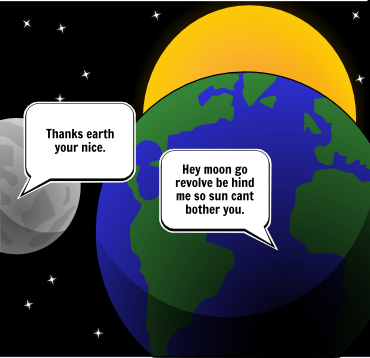
Screen Shot 2015-08-11 at 11.23.26 AMThird graders at Davis Elementary have been learning about the motions of the Earth, sun, and moon (SOL3.8a). They have also been learning how to identify the problem and solution in the stories they read (SOL3.5h). So today students in Ms. Eller’s class wrote solar system soap operas about problems and solutions that the Earth, sun, and moon might have. First we brainstormed some possible problems that they might have if they had personalities and could talk (personification). Next I explained that we would be creating a three-panel comic using StoryboardThat. The first panel would present the problem, the second panel would show them trying to solve the problem, and the last panel would present the solution. We signed into StoryboardThat with our Google accounts, and I showed them how to change the background of each panel using the Scenes tab. Then we added Characters. I explained that they could use the clip art categories to find images or they could search for a specific picture. Finally we used the Textables to create speech bubbles. I pointed out that this was the most important part. They had to be very careful about what they typed in the speech bubbles so that the problem and solution were clear. When they were finished, they pasted the links to their comments in Google classroom with a question for their classmates to answer. You can take a look at their comics here, and read some of the comments.


3rd Grade Educational Coins

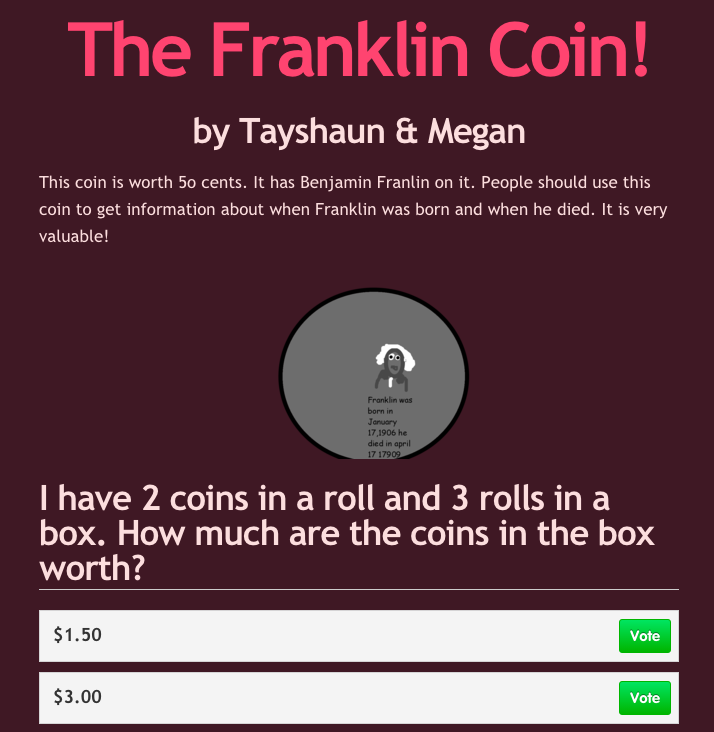
Screen Shot 2015-08-06 at 11.50.28 AMThird graders at Varina have been learning about money and multiplication in math (SOL3.8 & 3.2), so today students in Ms. Leo’s class designed their own educational coins and made up multiplication problems about them for their classmates to solve. First we discussed how the U.S. Mint designs new coins to sell and how, if people don’t like the designs, they won’t buy them. There are thousands of unused dollar coins sitting in vaults because no one wants them. I asked the students to guess the most popular coin (surprisingly, it’s the penny). Since they were also learning about the water cycle in science (SOL3.9), I told them to put something educational on their coins from science (water cycle, plant cycle, frog cycle, butterfly cycle, related to the circle shape of coin) or social studies (Greece, Rome, famous Americans, etc). They could either work with a partner or by themselves. Partners divided up the tasks, so one designed the coin using Pixie and the other designed a website about the coin using CheckThis. The website had to persuade people to buy the coin. Then they made a math multiplication word problems to explain how the coins are packaged and shipped out to banks (rolls of coins in boxes). Their sites were published to the classroom page, but you can take a look at them here.


3rd Grade Elapsed Time Slideshows

Screen Shot 2015-08-05 at 3.39.21 PMThird graders at Laburnum Elementary have been learning about elapsed time to the nearest hour (SOL3.11b), so today in Ms. Robinson’s class we created elapsed time slideshows. First they signed into Google classroom with their Google accounts. I had posted a blank Google slides template for each of them to open. I showed them how to choose a theme, add text, and change the font, size and color. Then they added a new slide. I explained that they would write an elapsed time problem about an activity of their choice for their classmates to solve. On this slide they would write about when their activity started. After the students wrote their problem, I showed them how to add a blank clock face (Image search “blank clock” or “clock face”). They could mask the clock with a circle (using the cropping tool) and add a frame (with outline color). Next we made arrows for the hands and placed them in the correct position. The students could make the hands a different color or thickness if they desired. Then we created a new slide and I gave them a choice to either tell what time the activity ended or tell how long the activity lasted. Their classmates would have to figure out the other part. We posted the links to their slideshows on Google classroom so they could write their answers in the comments. You can take a look at some of the slideshows and comments here.


3rd Grade Precipitation Probability Maps

Screen Shot 2015-08-04 at 4.49.55 PMThird graders at Holladay Elementary have been learning about the water cycle in science (SOL3.9) and probability in math (SOL3.18), so today Ms. Cowart’s students created precipitation probability maps. First we reviewed how probability relates to weather forecasting, and after so many snow days in February, the students were expert weathermen! We discussed the terms “likely”, “unlikely”, “certain,” and “impossible.” Next I posted a link to Google Maps on their Google classroom page and instructed them to click the “Create a New Map” button. They chose a type of precipitation/storm they had learned about (thunderstorm, snow, tornado, hurricane) and added an icon of it to their map. Then I showed them how to type a sentence and add a picture to it. They also added colored lines showing the probable paths of the storm. Finally they published their maps and posted the links to Google classroom. Their classmates added comments identifying the probability of the storm hitting Virginia. You can take a look at some of the maps and see the comments here.


3rd Grade Multiplication Comics

Screen Shot 2015-06-03 at 1.46.26 PMThird graders at Holladay Elementary have been learning how to multiply (SOL3.5), so today students in Ms. Marion’s class created multiplication comics using StoryboardThat. First we signed into our Google accounts, and then we were able to quickly sign into StoryboardThat using the Google button. I showed them how to change the setting for each panel and how to customize the characters. I instructed them to create a short story where multiplication was used. We reviewed that multiplication involves equal groups and then gave some examples. After the students created their pictures, they added text bubbles to explain the math. We posted our finished comics to Google classroom so we could see each others’. I also posted some of them here for you to see.