
5th Grade Graphs
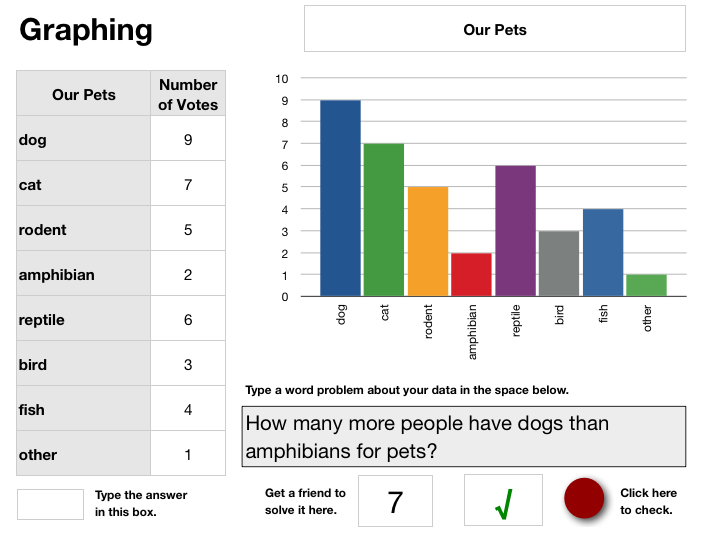 One of my fifth grade classes was working on graphing. Since most of these students have been making graphs since first grade, I wanted to focus on something different. Instead of just entering the data into the spreadsheet and making the graph, I wanted the students to experience the value of formulas and what they can do. I created a template where the graph is automatically generated when they enter the data so the students could move quickly to the next step which was writing a word problem about the data. They enter the answer into an “invisible box” then give the word problem to a friend to solve. The power of the hidden formula shows up when the friend checks his or her answer. If it’s wrong, an X automatically appears, and if it’s correct, a check mark appears. It’s almost like magic! Students can continue making up new problems or even change the data entirely. They can also customize the colors of the bars in the graph if they wish. You can download the template by clicking here and you can see the sample graph by clicking on the picture.

 Fifth graders at Laburnum are studying the five kingdoms (SOL 5.5b) and they wanted to make Keynotes. But they have been using Keynote since second grade with me, so today I taught them a special feature they had never used before (and maybe you haven’t either). It’s called Smart Builds, and it’s the button that looks like a Magic Hat in the tool bar. It adds a very cool effect to pictures that you can check out by clicking
  Numbers can be used to create eye-catching graphs of different concepts you are teaching in your Oceans Unit. For example you can use a pie chart to show the percentage of the earth that is covered by the oceans, you can use a bar graph to show the sizes of the different oceans, and you can use a stacked area graph to show the depths of the different ocean zones (adjust the opacity to make it transparent like water). Take a look at a sample
  For their Oceans Unit, 5th grade students at Chamberlayne Elementary created “talking Pages” where they have embedded videos right into their word processing documents. To make the videos, there are a couple of backgrounds in Photo Booth, or students can drag their own background picture over into it. Then students can introduce their paper, discuss vocabulary words, or do something creative like the student in
  Fifth graders at Chamberlayne Elementary were rock stars today. They made rock podcasts with photos of the different types of rocks jammin’ out on electric guitars. They added their own voiceovers to describe the rocks and how they are formed, then they chose a musical soundtrack. They didn’t finish today, but you can see what they started on by clicking
 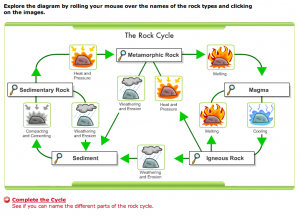 5th Graders at Chamberlayne worked on making Keynote slideshows for their Rocks unit this week. I gave them a template and a folder with pictures of the different types of rocks (metamorphic, igneous, and sedimentary). You can download the files by clicking