Category: 4th Grade

Teacher Spotlight – Ms. Norris

Ms. Norris, a fourth grade teacher at Laburnum Elementary, won the Henrico 21 award last year for her “Puppet Interviews Project” that I shared on my blog here. She’s continuing to do great things with technology in her class this year. One of the projects that has really impressed me is her classroom blog. She posts topics, and the students write comments about them. It’s a simple idea, but it has proven very effective. Her students are enthusiastically writing and responding on the blog. You can check it out by clicking here. Be sure to leave a comment! I’m sure her students would love hearing from you! If you’d like to have your own classroom blog, Henrico teachers can go here, type in your email name and password and get started! If you are outside the county, you can use the free site that Ms. Norris uses called KidBlog.

Tags:


4th Grade Animal Classification

Fourth graders at Chamberlayne have been learning about animal habitats (SOL4.4) and scientific investigation (SOL4.1) so we decided to combine both of these skills using Keynote. You can download the template by clicking here. The first slide shows a bunch of animals and the students have to classify them by habitat (land, water, air, land & water). Then they took that information and graphed it on the second slide. The graph helped show discrepancies between different classification systems the students used. For example, some students classified beetles in the land habitat, while others classified them in the air habitat. This provided opportunities for discussion and problem solving. The Keynote has some animations built into it which you can see by clicking here.


Tags:


4th Grade Investigations

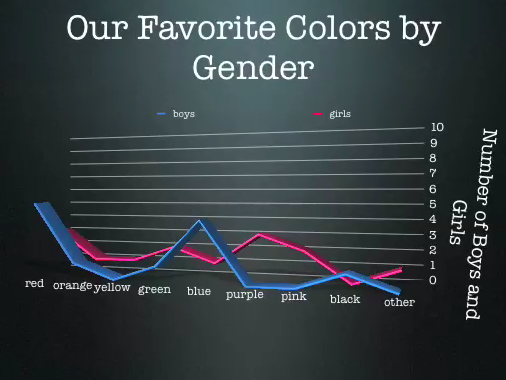
Today third and fourth graders at Laburnum worked on scientific investigations (SOL 3.1, 4.1) using Google Docs and Keynote. First they opened the Keynote template that you can download by clicking here. They made an hypothesis about which color was going to be the majority of the class’s favorite color, and they also hypothesized about the favorite color of the boys and the girls. Next they went to a Google Form online (you can see it by clicking here) and voted on their favorite colors. One of the advantages of using a Google Form is that it can instantly be sorted out in a Google Spreadsheet. So we looked at the spreadsheet (click here to see it), and I set it up with formulas to break the data down by whole class as well as gender. They used that to graph the results in their Keynote. Finally they added a conclusion at the end saying whether their hypothesis was right or wrong. You can check out a final version by clicking here.


4th Grade Virginia Regions Interactive Map

Fourth grade is currently studying the regions of Virginia. I’ve described some technology projects you can do for this unit earlier in my blog: here’s a video project and here’s a Keynote project. But today at Pinchbeck, Mr. Stein’s class wanted to make an embedded map like I did this summer. So first we used PhotoBooth to create videos about the regions. You could either download a folder of pictures to use as backgrounds by clicking here, or you can let your students take their own pictures of the different regions! How? Go to GoogleMaps and zoom down into a region, then go to Street View and take a screenshot of an interesting place. You take a screenshot by holding down the Apple (or Command) key + Shift + 4. The screenshots are saved in the Documents folder. Then use those pictures as backgrounds in PhotoBooth. If your students are having trouble finding a good spot to take a picture, I have some saved on this website. After the students made their videos, Mr. Stein created a embedded map with markers representing each student, so when you click on the marker you can view the student’s video. Take a look at the finished map here. The cool thing about putting the project on an embedded map on your website is that students are eager to show it off to their parents and friends so the motivation to review is built into the project.


4th Grade Student Interviews with Keynote

Today fourth grade students at Laburnum Elementary interviewed each other in a 21st century remix of the traditional first week of school activity. Each teacher had their students prepare questions ahead of time and grouped them into partners. Then I came in and explained the principles of being a good interviewer (asking probing questions, responding positively to answers, being enthusiastic) as well as being a good interviewee (replying with more than yes or no answers, elaborating, being upbeat and friendly). We modeled an interview, and then the students opened up Photo Booth and got to work video taping their interviews. Next the students put their videos into Keynotes so that they could add text to them. You can click here to see a finished Keynote. And click here to see a great example of how well the students learned the lesson of being a good interviewer and interviewee (notice their enthusiasm and elaboration). At the end of the lesson, Ms. Norris said that she would love to do this for book studies… students could make a different video and Keynote slide for each chapter. Great idea! I love it when teachers make connections like that!


4th Grade Podcast “Jamestown Hardships”

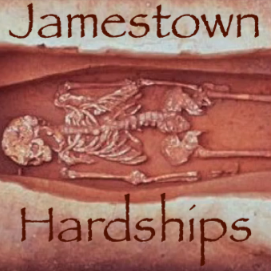
The end of the year is sometimes the best time to try out something new with technology. Maybe you haven’t had time during the year to really delve into a project, but now that the pressure of testing is over, you have some free time. Instead of just watching videos, why not have your students make their own videos or podcasts. Here’s one example that I’ve set up for you in GarageBand. It goes through the hardships of Jamestown. I have a picture of each hardship (swampy land, brackish water, disease, and lack of skills, SOL VS.3f) and students must record their voices explaining the hardships. They can also add in background music and sound effects. I’ve created a how-to video here, and in the video I explain how to put a copy of the template into each student folder quickly using an automator. You can download the automator on this page. Click here to download the “Jamestown Hardships” template, and you can see a sample podcast by clicking here. Go ahead and try something new here at the end!


4th Grade Math Movies

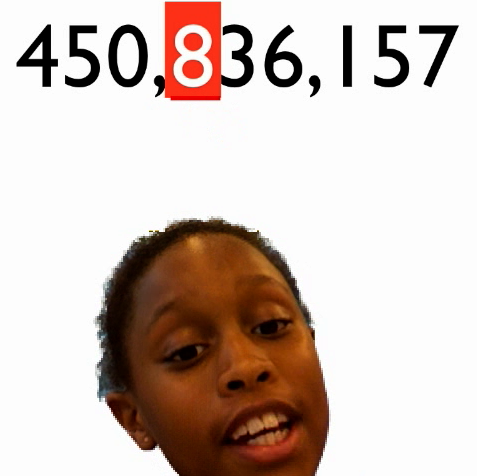
I’ve written several posts about using Photo Booth backgrounds to make cool videos. Just click on the photobooth tag over in the tag cloud to view them. But we’ve never made a math video… until now! You can use any photo or video as a background in Photo Booth. So for this lesson I created some animated math problems using Keynote. Then I exported them as QuickTime videos. You can download the videos by clicking here. Or you can make your own based on what your students need practice with. Students drag the videos into the Photo Booth backgrounds. Then they recorded themselves explaining the math concept. You can see some sample videos by clicking here and here.


4th Grade Perimeter and Area Revised

I posted about a perimeter/area activity for 4th grade a while back, but I had another request for the lesson, and so I revised it a little bit. That one was made in Pages, while this one is made in Numbers in order to use some of the special features of Numbers like formulas. I added a part at the bottom where students could create questions for a partner to solve. They enter the right answer in an “invisible” box and when their partner types an answer and presses the check button, it will tell them whether they are right or wrong. This makes it a little more interactive and students have to be sure they answered their own problems correctly. It can lead to some interesting discussions if the students’ answers don’t match. You can download the file by clicking here.


Tags:


4th Grade Revolutionary War Videos

Fourth graders at Holladay created videos to review the important people and events of the Revolutionary War. They used a combination of PhotoBooth and Keynote to make the movies. You’ll see from the examples that they used a lot of expression and really knew the information! I gave them a very basic Keynote template and a folder of pictures to use which you can download by clicking here. Then they created slides about famous Revolutionary War people and events and added the photos. Next they went into PhotoBooth and recorded a newscast about the topic. Some of the students used the special effects and backgrounds to add excitement and humor to their videos. Finally they dragged the videos into their Keynote, added transitions, and exported it all as a QuickTime video. I posted them to a writeboard online which you can access here (password = rw). Writeboard is a great place to share student work with parents very quickly and easily. If you’d like to see a student sample without visiting the writeboard, click here.


4th Grade Jeopardy SOL Review

Fourth grade students in Ms. Shaffer’s class at Laburnum Elementary created their own SOL Jeopardy Review game with Keynote. Each student wrote a social studies or science question on a slide. We talked about making the answer choices a little bit tricky. Then we made a “You’re right, go on to the next question!” slide and a “Try again” slide. You can click here to download the images we used on those slides. Next came the complicated part, but these students were up for the challenge because they’ve been working with Keynote all year. They had to add hyperlinks to each answer choice so when someone clicked on it they would be taken to the correct response slide. Then we had to add hyperlinked buttons to the response slides to either send them to the main screen to choose a new question or send them back to the same question to try again. Students who finished early could work on creating another question. I took all the slides and put them together into one Keynote, linking the buttons on the main screen to each question. The final result looks like this. It will be a great review for these students because it was created by them! Let me know if you’d like to make one with your class.


Tags: