Category: 2nd Grade

2nd Grade American Indian Math Animations
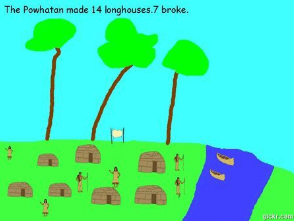
CaptureSecond graders at Davis Elementary have been learning about subtraction in Math (SOL2.7), and they’ve been studying American Indians in Social Studies (SOL2.2). Today students in Ms. Becker’s class created American Indian math animations. First we opened Pixie, and I instructed them to chose the Powhatan, Lakota, or Pueblo Indian tribe to illustrate. We discussed how to paint the environment for each tribe: the Powhatan lived in the woods, the Lakota lived on the plains, and the Pueblo lived in the desert. After the students painted the background, we went to stickers, and I showed them where the American Indian stickers were located. They added images of the Indians, their homes, plants, and animals. Since they were creating a subtraction problem, they had to copy and paste one of the stickers multiple times for the initial number (for example, 14 buffalo, 12 canoes, 18 pots). The students added a text box and wrote a sentence like, “The Lakota Indians saw 14 buffalo.” Next the students clicked File > Duplicate to make a copy of the picture, and they typed a sentence telling how many were subtracted. They also deleted the corresponding number of stickers. We exported the two pictures as JPG files, then went to Gickr and uploaded the image files. Gickr turns still photos into an animated GIF file. Once the GIF files had been created and downloaded, students uploaded them to Google classroom for their classmates to solve. You can see them all here.


2nd Grade American Indian Place Value

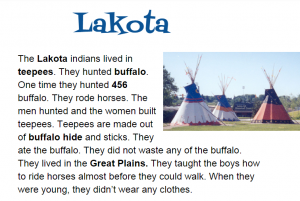
CaptureSecond graders at Holladay Elementary have been learning about the American Indians in Social Studies (SOL2.2) and place value to hundreds in math (SOL2.1). So today Ms. Fournier’s class wrote place value questions about the American Indians for their classmates to solve. I posted an assignment in Google classroom with a blank Google document and made a copy for each student. When they opened their copy, I instructed them to chose an Indian tribe (they had only learned about the Powhatan and the Lakota so far) and to type the name of the tribe for the title. Then we changed the font, size, and color of the title. Next they typed a few facts about their tribe, and one of the facts needed to include a 3-digit number. I also suggested that they make the important words bold, since they’ve been learning about that as a nonfiction text feature (SOL2.9a). Finally I showed them how to insert an image. We published our assignments, copied the links, and posted them to Google classroom with a question for our classmates to answer. They had to identify the ones, tens, or hundreds place of the number in the text. You can take a look at all their stories here.


2nd Grade Weather Sequence

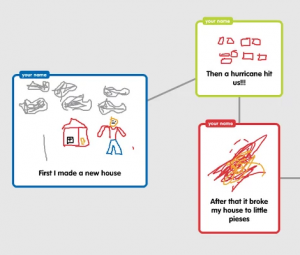
CaptureSecond graders at Davis Elementary have been learning about different types of storms in Science (SOL2.6a) and sequence words in Language Arts (SOL2.6c). So today in Ms. Becker’s room we created weather sequence diagrams using Popplet. This was my first lesson using Popplet since their recent update. Since students aren’t allowed to create accounts, we need to use the demo mode. It used to be full-featured, but now the demo mode has some restrictions (you can’t delete bubbles, and you can’t change the title of the bubbles). Due to these restrictions, I’ll probably use Google diagrams instead of Popplet for future lessons. First the students chose a type of storm: thunderstorm, tornado, hurricane, blizzard, flood. Then they created three bubbles to tell their storm story in sequence. They used words like “first,””next,” and “then.” Using the connectors they connected the bubbles together in order. The students also drew a picture in each bubble (that is one feature of Popplet I really like). We exported the images as .JPG files and then published them to Google classroom. The students were instructed to finish each others’ stories in the comments section using words like “Finally” or “Last.” You can take a look at some samples here.


2nd & 5th Grade Superheroes

superhero1Many schools have a superhero theme this year, and there are lots of cool websites for turning yourself into a superhero. Some of my favorites are: Hero Machine, Marvel Commics, and Heroized. Today 2nd graders in Ms. Becker’s class and 5th graders in Mr. Cangelosi’s class at Davis Elementary turned themselves into superheroes using Pixie and Google slides. First we opened up Pixie and painted a superhero body. Then we used the webcam tool to add our photo to the body. We exported the pictures as PNG images with transparent backgrounds. Next we opened up a Google slides template that I shared on Google classroom. Each student was assigned a slide, and they added a background image. Then they uploaded their superhero picture to their slide. Finally they wrote a sentence or two about their superpower and maybe their weakness (that was optional). Take a look at the Davis superheroes here: Becker and Cangelosi.


2nd Grade Butterfly Measurement

Screen Shot 2015-08-12 at 9.20.04 AMSecond graders at Holladay Elementary have been learning about the butterfly life cycle in science (SOL2.4a), and they’ve been measuring length in inches and centimeters in math (SOL2.11a). Today students in Ms. Gardner’s class created butterfly life cycle diagrams with actual size butterflies. First they logged into Google classroom where I posted a link to a website about Virginia butterflies. This is a great site because its shows the different stages of most of the butterflies’ life cycles. Once the students picked a butterfly they liked, they opened this template that I shared with them on Google classroom. First they changed the title text to be the name of their butterfly. Then they inserted a picture of their butterfly from the website. The template has an actual size ruler on it which they can use to measure the butterfly or they can use a real ruler. I instructed them to resize their butterfly picture (using the corners to keep it from being distorted) so that the image is the same size as the real butterfly. Students found the length of the butterfly on the website (under wingspan). Next I showed them how they could use the drawing tools to draw the other stages in the life cycle or they could insert images from the website. They labeled each stage and added connector lines to link them together. Connector lines (Insert > Line > Curved Connector) are different than regular lines because they link to small dots that appear on the images so when you move the image the line moves with it. Finally we shared our butterfly life cycles with our classmates by posting the links on Google classroom. They also wrote the size of their butterfly in inches on their post. You can take a look at some of them here.


2nd Grade Magnet Fractions Animations

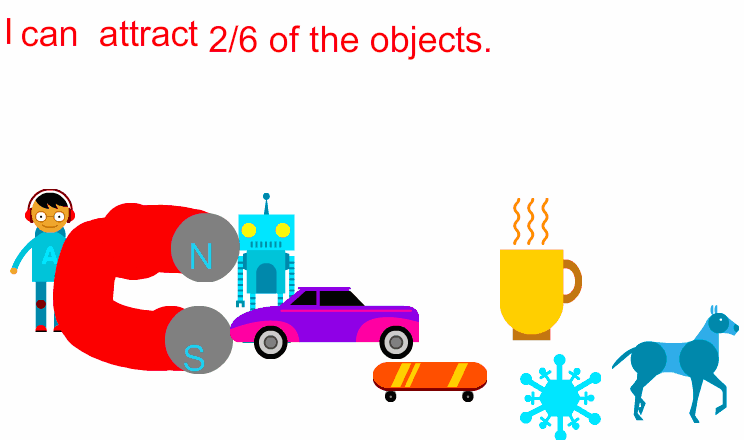
Screen Shot 2015-08-03 at 4.51.48 PMSecond graders at Holladay Elementary have been learning about magnets (SOL2.2) and fractions (SOL2.3) so today students in Ms. Gardner’s class created magnet fractions animations. First we reviewed the types of magnets (horseshoe or bar), their poles, and what types of objects they attract. Then I posted a link to ABCYa! Animate on Google classroom. I instructed them to use the clipart to add a person to their picture. Next they drew a magnet and labeled the poles with an N or an S. Then they went to the clipart library and added various objects that would be attracted to the magnet and others that would not. I showed them how to copy the picture into new frames and how to move the objects slowly toward the magnet in each frame. Finally they typed a sentence telling the fraction of objects that the magnet attracted. We published our finished animations to Google classroom. You can take a look at some of them here.


2nd Grade Matter Fractions

CaptureSecond graders at Holladay Elementary are learning about fractions in math (SOL2.3) and the states of matter in science (SOL2.3) so today students in Ms. Crostic’s class created matter fractions animations. First we discussed fractions and the parts of fractions. Looking at a sample group of solids, liquids, and gasses, we made fractions, identifying the denominator as the total number of things in the group, and the numerator as the smaller number of solids, or liquids, or gasses in the group. Next we went to ABCYa! Animate to create the animations. The students added clip art images of their choice to represent their own groups of solids, liquids, and gasses. In one frame they circled the total number of objects, and in the other frames they circled the specific groups of solids, liquids, or gasses. When the animations were finished, the students posted them to their Google classroom page with a question for their classmates to answer like, “What fraction are liquids?” They answered each others’ questions in the comments. I put a few examples into a Google doc that you can view here.


2nd Grade Animal Videos

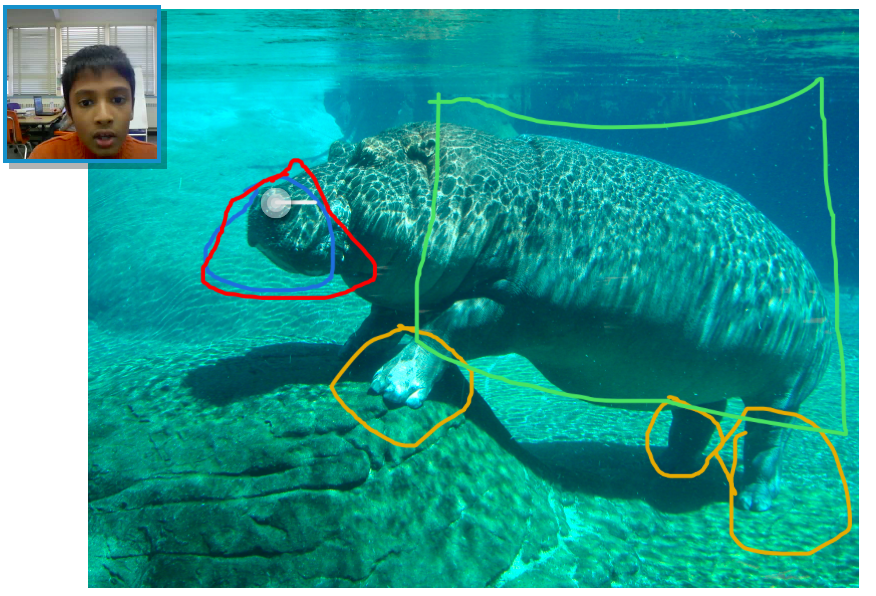
Screen Shot 2015-05-29 at 1.33.54 PMSecond graders at Davis Elementary have been learning about living systems (SOL2.5) and how animals’ adaptations help them survive, so today students in Ms. Jefferson’s class created animal videos using Pixiclip. Pixieclip is an online whiteboard where you can draw, type, or upload photos, and it records your webcam so you can explain what you are doing. The students first chose an animal they were interested in learning more about. We did some quick online research to identify the animal’s special features that help it survive. We also downloaded a photo of our animal. Next we went to Pixiclip and uploaded the photo. There are 3 choices: start doodling (no audio or video), add audio message, or add video message. I explained that they could choose to make an audio or video message, depending on if they wanted to be filmed. They dragged their photo to the whiteboard which triggers the recording to start. Then the students used the pen tool to circle special features on their animals and explained the function of each one. When they were finished, they posted their links to the Google classroom page so they could watch each others’ videos. I posted a few to a Google doc that you can see here.


2nd Grade Place Value & Number Sense

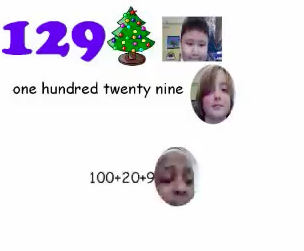
Screen Shot 2015-05-18 at 3.37.10 PMSecond graders at Davis Elementary have been learning about place value for numbers up to 999 (SOL2.1). Ms. Barnes had sent me a message saying she wanted to review using Pixie with them, so we created collaborative place value movies. First we opened a blank Pixie document and I showed them how to add a text box and change the font, size, and color. I told them to type any 3-digit number they wanted up to 999. Then we searched the stickers for a picture of something they found interesting (since Christmas is coming, many of them chose Christmas stickers). Next I showed them how to take their photo and record their voice saying their number in a sentence like, “I’m Brian, and I have 129 Christmas trees!” To make things a little more interesting, I instructed them to switch seats with a partner. Their partner would type the word form of the number, take their picture, and record their voice saying the number again. Then I told them to switch again, and this time they would write the expanded form of the number, but we didn’t have time to record our voices this last time. You can see some of their videos by clicking here.


Tags:


2nd Grade American Indian Math

Screen Shot 2015-05-12 at 10.01.42 AMSecond graders at Davis Elementary have been learning about three American Indian tribes: the Powhatan, the Lakota, and the Pueblo Indians (SOL2.2). They have also been learning how to solve and create their own addition and subtraction story problems (SOL2.21). So today students in Ms. Vest’s class created story problems about American Indians. First they chose a tribe, then we opened Pixie, and I showed them how to add stickers and paint to make a picture of the tribe. We discussed features to include like the landscape, their homes, the animals they hunted, and the modes of transportation they used. We exported the finished pictures as .jpg files, then we posted them to our Google classroom page. I instructed them to type a story problem to go with their picture. Then their classmates could try solving the problems and writing the answers in the “Comments” section. You can take a look at some of their problems on Padlet.


Tags: