Category: Science

3rd Grade Animated Life Cycles
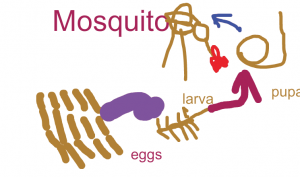
CaptureThird graders at Laburnum Elementary have been studying animal life cycles (SOL3.8b), so today students in Ms. Collins’ class created animated insect life cycles using ABCYa! Animate. We picked insects because many students are very familiar with the butterfly life cycle, but they are not familiar with other insects’ life cycles. First we did some research. The students picked an insect they were curious about (ants, fireflies, mosquitoes, cockroaches, ladybugs, etc) and searched for a life cycle diagram for that specific insect. Next they searched for photographs of each stage in the insect’s life cycle to see what they really looked like. Students were amazed at how bugs looked so different in their larva stages! When our research was finished, I posted the link to ABCYa! Animate on Google classroom. On the first frame of the animation I showed them how to draw a picture of the insect’s eggs and label it “eggs”. We used the copy cat button to copy the picture, and then we added an arrow to it. We copied that picture and added the “larva” stage. We continued copying each picture and adding stages to the life cycle until it was complete. Then we adjusted the speed of our animation and exported it as a .gif file. Finally, we uploaded our animations to Google classroom so everyone could see them. You can see them all here.
1st Grade Earth & Sun Stories

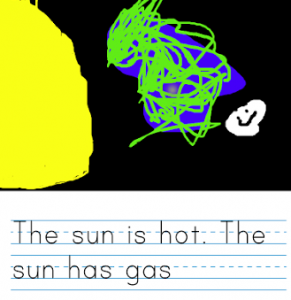
CaptureFirst graders at Holladay Elementary have been learning about the Earth and the sun in science (SOL1.6), and they have been learning how to write complete sentences in English (SOL1.13d), so today they wrote Earth & Sun stories with Storymaker. Storymaker gives students a fun way to write and illustrate stories on the computer. First we illustrated the picture. Students used the paint bucket to fill in the background with black. Then we discussed the relative sizes of the sun, Earth, and moon, and they painted them as realistically as possible. Some students even included the moon’s craters! Next we worked on the writing part. I instructed the students to write facts about the Earth, sun, and moon in complete sentences. They used phonetic spelling (SOL1.12c) for words they didn’t know, and they used capitals and periods (SOL1.13e). Finally we saved our stories and published them to Google classroom. I put them all on a Google doc so you can read them here.


1st Grade Winter Compound Words

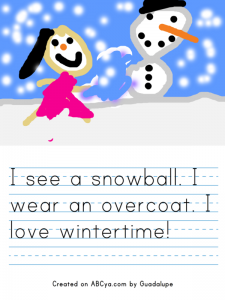
Story_Maker1First graders at Holladay Elementary are learning about winter in science (SOL1.7) and compound words in Language Arts (SOL1.6g), so today students in Ms. Schemmel’s class wrote and illustrated sentences with winter compound words. We used ABCYa! Storymaker, which is a great site for writing in the lower grades. First we brainstormed a list of winter compound words: snowman, earmuffs, overcoat, wintertime, snowball, gingerbread, fireplace, snowflake, iceberg, frostbite, evergreen, peppermint, sweatshirt, turtleneck, pullover, snowplow, etc. Next students typed a sentence or two about winter using some of the compound words we discussed. I explained how to start each sentence with a capital using Shift, put a space between each word with the space bar, and end each sentence with a period. It’s also important to explain to first graders that when they get to the end of the line, it will automatically go to the next line if they just keep typing. When they finished their sentences, they used the painting tools to paint a winter picture. I showed them how to use the paint bucket to fill in the sky and the spray can to make snowflakes. When they were finished, we saved them, and I uploaded them to CoMemories. You can see them all here.


2nd Grade Rounding with Habitats

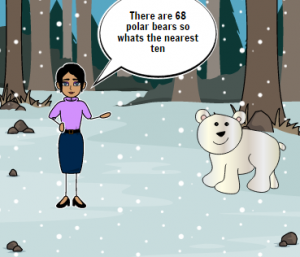
CaptureSecond graders at Holladay Elementary are learning how to round to the nearest ten in math (SOL2.1b) and they are studying habitats in science (SOL2.5), so today students in Ms. Edmonds’ class created comics about rounding numbers in habitats. First, I posted a link to StoryboardThat on Google classroom. StoryboardThat is an amazing webtool that students can use to create their own comics. I introduced the lesson by explaining that scientists often count living and nonliving things in a habitat, but since they can’t count every single one, they usually round the numbers. I instructed the students to choose a habitat they were curious about (desert, forest, ocean, etc) and think about the living and nonliving things in that habitat. They could do some quick research online if necessary. When the students had their ideas, they clicked the Storyboard link and were given a blank comic strip with three boxes. I explained that they would put living things (plants and animals) from the habitat in two boxes and nonliving things (rocks, shells, etc) in the other box. They dragged in backgrounds, characters, and clip art into each scene. They enjoyed changing the facial expressions and poses of the characters. Then we added speech bubbles for the characters to say how many of each living and nonliving thing there were in the habitat. We took a screenshot of our comics and posted them to Google classroom with a question about rounding the animals, plants, or nonliving things in the habitat. Our classmates tried rounding the numbers in our comics to the nearest ten, and they posted their answers in the comments. You can try them yourself here.


3rd Grade Estimating Weight of Matter

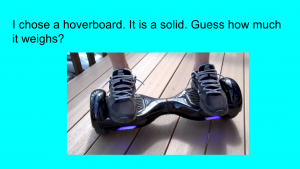
CaptureThird graders at Varina Elementary are learning how to estimate weight in math (SOL3.9c), and they are studying matter in science (SOL3.3) so today students in Ms. Hambrick’s and Ms. Leo’s classes estimated the weights of different types of matter. First I gave them each a copy of a blank Google slideshow template in Google classroom. I explained the concept, that they would pick a type of matter (solid, liquid, or gas) that they were curious about and estimate its weight. Then we would research its actual weight. With that in mind, I instructed the students to find a background image for their title slide that showed matter. They typed a creative title, changed the font, size, and color, and typed their name in the subtitle. Next, we created a new slide with “Title only” and changed the background color. The students typed a sentence about their object, identifying it as a solid, liquid, or gas and wrote a question for their classmates to estimate its weight. We had to discuss the incredible variety of matter all around so they weren’t copying a few ideas (it seemed like everyone wanted to weigh hoverboards and cheetahs). They came up with some good ideas that even got me curious. How much does a tree weigh? How much does the water in a pool weigh? Once they had their estimation slide finished, we made one more with the answer. Students had to do a Google search to find the actual weight of their object, and we discussed reliable and unreliable results. Finally we published the slideshows and posted the links on Google classroom so they could practice estimating weight with each other’s presentations. You can see them all here.


5th Grade Plant Inferences

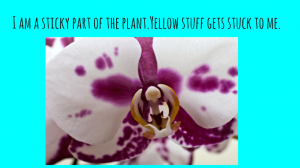
CaptureFifth graders at Varina Elementary have been learning about plants in science (SOL5.5) and they have been making inferences in reading (SOL5.5i). Since solving riddles often involves making inferences, students in Ms. Kirchmier’s class wrote plant riddles for each other to solve. We used Google slides to create the riddles. I gave them a blank template in Google classroom and showed them how to make a title page with a background image. For the second slide, students chose a color background and added a text box with their riddle. I explained that the riddle had to be about a plant part, and it had to make students think. Riddles shouldn’t be too easy to solve. Next students inserted a photo from a Google search and added animations and transitions. Finally they published their slideshows (File > Publish) and posted the links on Google classroom. Students solved each other’s riddles in the comments section. You can see them all here.


4th Grade Nonfiction Text Features

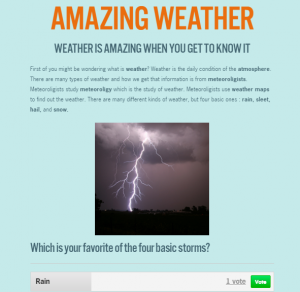
website2Fourth graders at Davis Elementary have been learning about nonfiction text features (SOL4.6a) and drawing conclusions using textual information (SOL4.6f). So today students in Ms. White’s class created nonfiction websites using CheckThis. Since they have been studying clouds (Science SOL4.6) and Jamestown (VS.3), they made their websites about one of those topics. First we reviewed text features to include like bold type, headings, captions, and photographs. I also explained that their classmates would be using the information in their websites to draw conclusions, so they needed to be thinking of good questions to ask about their topics. Next, we went to CheckThis and created a website without signing in. Since students can’t create an account, we had to finish the website during the one hour lesson, which wasn’t a problem for this class. I showed them how to customize the colors and fonts of their page. Then the students typed their information, making important words bold. I was surprised at how much they were able to type in such a short time! They also added a photo and a poll. The polling feature is one of the reasons I prefer CheckThis to other webpage-creation services because it adds an interactive element to the students’ websites. Finally we published our sites, copied the links, and posted them to Google classroom with a good question for our classmates to answer in the comments. You can take a look at all their websites here.


3rd Grade Animated Food Chains

CaptureThird graders at Holladay Elementary have been learning about aquatic and terrestrial food chains in Science (SOL3.5), so today students in Ms. Middleton’s class created animated food chains using Google Slides. First I posted a blank template to Google classroom and set it up to make a copy for each student. We discussed the different habitats they have learned about (rainforest, grasslands, desert, ocean, etc), and I told them to chose one for their food chain diagram. On the first slide, the students clicked the background button and chose an image of their habitat. Then we added the title and their name. I showed them how to change the font, size, and color so it showed up well on the background image. On the second slide we added a sun shape by clicking the Shapes button and changing the fill and outline colors. We double-clicked inside the shape and typed the word “Sun.” Next I showed them how to add the other plants and animals by clicking the Image button and doing a Google search. Under each animal or plant the students added a text box label. We also added curved connectors (Line > Curved connector) with arrows showing the flow of energy to connect the images together. Finally we added animations to each picture so they appeared in order. The students posted their finished slideshows to Google classroom, but you can see them all here.


2nd Grade Weather Sequence

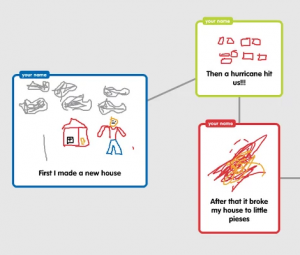
CaptureSecond graders at Davis Elementary have been learning about different types of storms in Science (SOL2.6a) and sequence words in Language Arts (SOL2.6c). So today in Ms. Becker’s room we created weather sequence diagrams using Popplet. This was my first lesson using Popplet since their recent update. Since students aren’t allowed to create accounts, we need to use the demo mode. It used to be full-featured, but now the demo mode has some restrictions (you can’t delete bubbles, and you can’t change the title of the bubbles). Due to these restrictions, I’ll probably use Google diagrams instead of Popplet for future lessons. First the students chose a type of storm: thunderstorm, tornado, hurricane, blizzard, flood. Then they created three bubbles to tell their storm story in sequence. They used words like “first,””next,” and “then.” Using the connectors they connected the bubbles together in order. The students also drew a picture in each bubble (that is one feature of Popplet I really like). We exported the images as .JPG files and then published them to Google classroom. The students were instructed to finish each others’ stories in the comments section using words like “Finally” or “Last.” You can take a look at some samples here.


4th Grade Virginia Weather Graphs

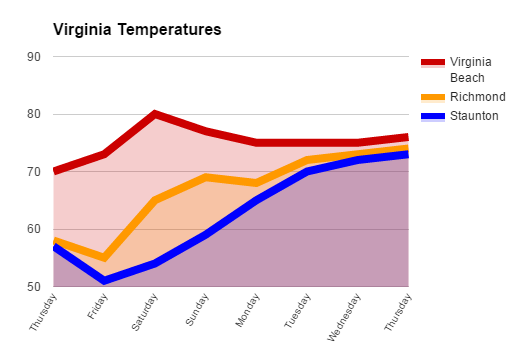
VAGraphFourth graders at Davis Elementary are learning about weather in science (SOL4.6), Virginia regions in social studies (VS.2b), and graphing in math (SOL4.14). So today students in Mr. Cochran’s class researched current temperatures in different regions of Virginia and graphed them. I gave them a template that you can copy here. First we clicked the “City” link and looked at the current temperatures in different Virginia cities. I showed them how they could click the column headings to sort by that category, so we sorted by temperature. We took a city from the highest temperatures (Virginia Beach), a city in the middle temperatures (Richmond), and a city in the low temperatures (Staunton). Then we located those cities on a map of Virginia and discussed why the temperatures might be different. The students noticed that the colder cities were further west (higher altitude) and north (higher latitude). Next we looked at the weekly forecast for the three cities (linked on the spreadsheet). Your students could choose their own cities to graph, but we just graphed the temperatures for the three cities we researched to save time. On the spreadsheet I showed them how they could click the “Thursday” cell and drag the small blue square handle down through seven more cells to have them fill in with the days of the week. Then they filled in the rest of the cells with the temperatures. Next we clicked the graph button and chose a line graph. I showed them how to customize the color and thickness of the lines, and we added a title. They posted their graphs to Google classroom, but you can take a look at some here.