Category: Math

3rd Grade Money & Change Comics

CaptureThird graders at Laburnum Elementary have been learning how to count money and make change (SOL3.8), so today students in Ms. Ford’s class created comics about buying things and getting change back. I posted a link to StoryboardThat on Google classroom, and when students opened the website we clicked “Create a Storyboard.” First we looked at the background Scenes and discussed possible places where money is exchanged: grocery store, restaurant, shopping mall, movie theater, school, etc. I explained that their comic would have 3 frames: the first one would be about how much the item costs, the second one would be about how much money the character paid, and in the last frame, a character would ask a question for the students to solve, like, “How much change would I get back?” For the characters, I demonstrated how to customize their colors, costumes, and expressions. I also showed the students how to use the Search box to find additional props, like money and objects to buy. The last step in making the comic was to add the speech bubbles and type complete sentences in each frame about the money story problem. When they were finished, the students took screenshots of their comics and uploaded them to Google classroom for their classmates to solve. You can see some examples here.
1st Grade Time Slideshow

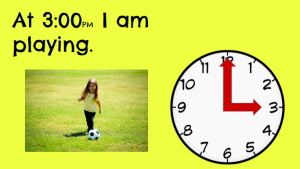
CaptureFirst graders at Holladay Elementary have been learning how to tell time using analog and digital clocks (SOL1.8). Today, we practiced telling time with analog clocks in Ms. French’s class. I gave each student a Google slideshow template that you can copy here. On the first slide, the students typed their names and we discussed what time was shown on the clock. On the other slides they clicked and dragged the correct clock hands to show the times. They could delete the unused hands by clicking on them and pressing the Backspace button (optional). Then they typed a sentence about an activity they would do at that time. I pointed out that the times were all PM so they were in the afternoon or night. I also showed them how to click the image button and search for a picture of the activity by typing it in the box (words like eating, playing, sleeping, etc). After adding photos to each slide, we went back to the first slide and I showed them how to watch their presentation by clicking the “Present” button. You can see a sample slideshow here. UPDATE 3/16/2016 I taught a similar lesson in Ms. Pope’s 1st grade class at Laburnum, except this time we used Storymaker. You can see those samples here.


4th Grade Patterns

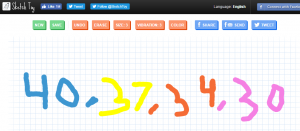
CaptureFourth graders at Varina Elementary have been learning about numeric and geometric patterns (SOL4.15), so today students in Ms. Thomas’ and Ms. Connell’s classes created patterns using a variety of webtools. Ms. Thomas’ class hadn’t used Google slides yet, so I wanted to show them how to make an animated slideshow. I posted a blank template on Google classroom and set it to make a copy for each student. When they opened their copy, each student clicked the Background button at the top and searched for a pattern image to use. Then they typed their title and name. Next, we created a new slide and chose a background color. I showed them how to add shapes and change the border and fill colors. They created their patterns with shapes, then I explained how to add a transition to each shape so that they appeared in order. When they were finished, we clicked the Share button and changed the privacy settings so that anyone with the link could view the slideshow. The students pasted their links to Google classroom so that their classmates could try to solve their patterns. Ms. Connell’s class had already made slideshows, so I showed them three webtools for animation: Parapara, SketchToy, and ABCYa!Animate. The students could choose which one they wanted to use, and they could use more than one if they had time. Parapara is good for quick, simple animations. Sketchtoy redraws anything you draw with cool vibrating lines. I’ve showcased ABCYa! Animate many times on this blog because it’s one of the best animation webtools for kids that I’ve seen. Ms. Connell’s class created both geometric and numeric patterns. You can see them all here.


4th Grade Civil War Marching Maps

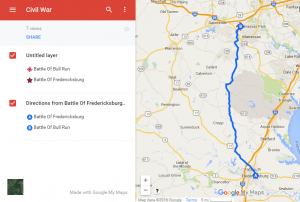
CaptureFourth graders at Holladay Elementary have been learning about the Civil War in Social Studies (VS.7) and measurement in math (SOL4.7) so today we created Civil War Marching Maps using My Google Maps. First the students chose two major Civil War battles to mark on the map (Bull Run, Fredericksburg, Richmond, Appomattox, or Hampton Roads). Then they added an image and some brief factual information about the battle to each marker. Next we clicked on a marker and chose the directions icon at the bottom of the popup window (it looks like an arrow). That added a new layer to the map legend on the left with the location marked as “B”. We added the name of the other marker in the “A” box, and clicked the three dots to choose “Step-by-step directions.” That gave us the distance in miles. However, the time wasn’t accurate because it was based on driving, whereas the Civil War soldiers marched. So we clicked the car icon and changed the Transportation mode to walking. Now students had an estimate of how long it would take for the soldiers to march from one battle to another. Yet that still was not accurate because soldiers didn’t march nonstop. They averaged 15-30 miles per day, so students could divide the distance by 20 or 25 to figure out how many days it would take for Civil War soldiers to march that distance. Students shared their maps on Google classroom, and you can see them all here.


5th Grade Shapes Comics

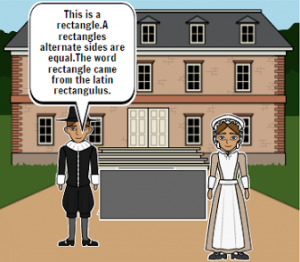
CaptureFifth graders at Laburnum Elementary have been learning about 2-D plane figures such as the rhombus, trapezoid, parallelogram, etc (SOL5.13), so today students in Ms. Hall’s class created comics about these shapes using StoryboardThat. First we discussed the various shapes and brainstormed ideas for making a comic about them. I explained that the comic would have three frames, and it should be consistent through all three frames. In other words, if one frame is about shapes in sports, the whole comic should be about shapes in sports. Next we went to Storyboard that and selected the backgrounds for the comic using the “Scenes” tab. We also added characters that fit the backgrounds. I showed them how to customize the characters’ appearance and poses. Then, using the “Shapes” tab, we added shapes that went along with the backgrounds and characters. To explain the shapes, students added speech bubbles using the “Textables” tab. We discussed the importance of using correct grammar and spelling. Finally, we took screenshots of our comics and posted them to Google classroom with a question for our classmates to answer. You can see them all here.


3rd Grade Time & Matter

CaptureThird graders at Holladay Elementary have been learning about the states of matter in science (SOL3.3) and equivalent time in math (SOL3.12), so today we created Google slideshows exploring how long it would take for different types of matter to change states in equivalent times. First I made a blank Google slideshow and posted it to Google classroom so every student got a copy. On the cover slide, I showed them how to pick a background image about time using a Google image search. Then we added a title and our names and changed the font, size, and color of the text. Next we added a new slide, and I instructed the students to think of a type of matter that could melt and/or freeze. They wrote a sentence about how long it would take for their matter to change states, and they also wrote a question for their classmates to answer about the equivalent time in another unit (seconds, minutes, hours, etc). They added a picture of their type of matter, and I showed them how to add transitions and animations to the slide. Finally we published them to the web and posted the links on Google classroom so the students could solve each others’ problems. You can see all their slideshows here.


2nd Grade Rounding with Habitats

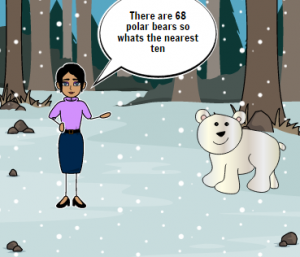
CaptureSecond graders at Holladay Elementary are learning how to round to the nearest ten in math (SOL2.1b) and they are studying habitats in science (SOL2.5), so today students in Ms. Edmonds’ class created comics about rounding numbers in habitats. First, I posted a link to StoryboardThat on Google classroom. StoryboardThat is an amazing webtool that students can use to create their own comics. I introduced the lesson by explaining that scientists often count living and nonliving things in a habitat, but since they can’t count every single one, they usually round the numbers. I instructed the students to choose a habitat they were curious about (desert, forest, ocean, etc) and think about the living and nonliving things in that habitat. They could do some quick research online if necessary. When the students had their ideas, they clicked the Storyboard link and were given a blank comic strip with three boxes. I explained that they would put living things (plants and animals) from the habitat in two boxes and nonliving things (rocks, shells, etc) in the other box. They dragged in backgrounds, characters, and clip art into each scene. They enjoyed changing the facial expressions and poses of the characters. Then we added speech bubbles for the characters to say how many of each living and nonliving thing there were in the habitat. We took a screenshot of our comics and posted them to Google classroom with a question about rounding the animals, plants, or nonliving things in the habitat. Our classmates tried rounding the numbers in our comics to the nearest ten, and they posted their answers in the comments. You can try them yourself here.


4th Grade Comparing Fractions

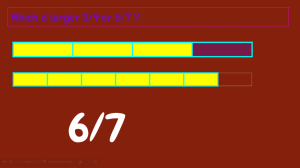
CaptureFourth graders at Varina Elementary have been learning how to compare fractions (SOL4.2a), so today students in Ms. Connell’s class compared fractions using Google slides. I gave them a blank slideshow in Google classroom and showed them how to change the font, size, and color of the title (“Fractions”) and subtitle (their name). Next we added a background image to the title slide. For the second slide, we added a background color instead of an image. The students typed a sentence asking their classmates to tell whether one fraction was greater or less than another fraction. I asked them to pick fractions that were challenging to compare, for example 2/3 and 7/12, instead of simple ones like 1/2 and 1/4 that could easily be compared. We used tables to show the fractions. I taught them how to add a table with the table button and to click and drag across the correct total number of squares (the denominator of the fraction). We used the paint bucket to fill in the number in the numerator. When you add tables to a slide, they are automatically the same size and the squares are equal, so it really worked out well for comparing the fractions (unless the students re-sized them on accident). Next, we added a text box with the answer and used transitions so the answer appeared at the end. Finally, we published our slideshows and pasted the links to Google classroom. You can see them all here.


3rd Grade Estimating Weight of Matter

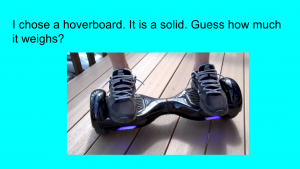
CaptureThird graders at Varina Elementary are learning how to estimate weight in math (SOL3.9c), and they are studying matter in science (SOL3.3) so today students in Ms. Hambrick’s and Ms. Leo’s classes estimated the weights of different types of matter. First I gave them each a copy of a blank Google slideshow template in Google classroom. I explained the concept, that they would pick a type of matter (solid, liquid, or gas) that they were curious about and estimate its weight. Then we would research its actual weight. With that in mind, I instructed the students to find a background image for their title slide that showed matter. They typed a creative title, changed the font, size, and color, and typed their name in the subtitle. Next, we created a new slide with “Title only” and changed the background color. The students typed a sentence about their object, identifying it as a solid, liquid, or gas and wrote a question for their classmates to estimate its weight. We had to discuss the incredible variety of matter all around so they weren’t copying a few ideas (it seemed like everyone wanted to weigh hoverboards and cheetahs). They came up with some good ideas that even got me curious. How much does a tree weigh? How much does the water in a pool weigh? Once they had their estimation slide finished, we made one more with the answer. Students had to do a Google search to find the actual weight of their object, and we discussed reliable and unreliable results. Finally we published the slideshows and posted the links on Google classroom so they could practice estimating weight with each other’s presentations. You can see them all here.


2nd Grade American Indian Math Animations

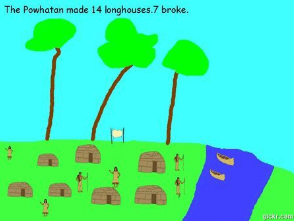
CaptureSecond graders at Davis Elementary have been learning about subtraction in Math (SOL2.7), and they’ve been studying American Indians in Social Studies (SOL2.2). Today students in Ms. Becker’s class created American Indian math animations. First we opened Pixie, and I instructed them to chose the Powhatan, Lakota, or Pueblo Indian tribe to illustrate. We discussed how to paint the environment for each tribe: the Powhatan lived in the woods, the Lakota lived on the plains, and the Pueblo lived in the desert. After the students painted the background, we went to stickers, and I showed them where the American Indian stickers were located. They added images of the Indians, their homes, plants, and animals. Since they were creating a subtraction problem, they had to copy and paste one of the stickers multiple times for the initial number (for example, 14 buffalo, 12 canoes, 18 pots). The students added a text box and wrote a sentence like, “The Lakota Indians saw 14 buffalo.” Next the students clicked File > Duplicate to make a copy of the picture, and they typed a sentence telling how many were subtracted. They also deleted the corresponding number of stickers. We exported the two pictures as JPG files, then went to Gickr and uploaded the image files. Gickr turns still photos into an animated GIF file. Once the GIF files had been created and downloaded, students uploaded them to Google classroom for their classmates to solve. You can see them all here.