Tag: pixie

1st Grade Pixie Word Problems
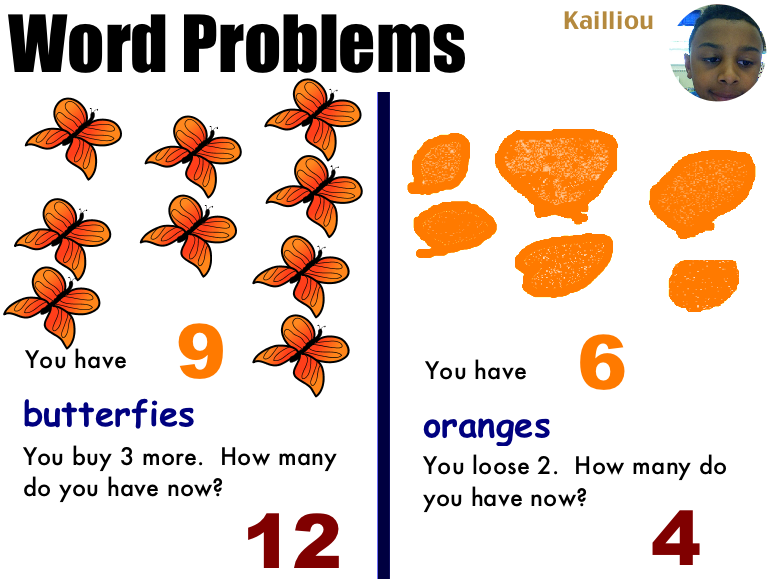
Ms. Baker’s first grade class at Chamberlayne Elementary created some great word problems today using Pixie. I gave them a template to use that you can download by clicking here. They wrote their names on it and took their pictures using the built-in webcam feature on Pixie. The first word problem was addition, so the students got as many stickers as they wanted to illustrate it. Then they entered the numbers and solved the problem. The second one was subtraction. This time they drew the objects using the paint brush tool. Then they entered the numbers and solved that problem as well. You could also have them work with a partner on this part. Finally the students recorded themselves explaining the word problem… and as you can tell from this example, some of the students were very enthusiastic about their explanations.
Tags:


3rd Grade Simple Machines

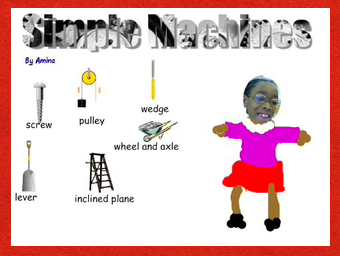
Third graders at Laburnum have been studying simple machines (SOL 3.2) so they created Pixie projects to show off what they have learned. If you click here you can see a sample, and if you click here you can download the template to get your started. First we created Word Art (the directions are on the template), then we found Stickers of the simple machines (go to the Science folder, then to the Simple Machines folder). Next the students took their picture and drew their bodies. Finally they recorded an audio voiceover identifying the machines. There are many other project ideas you could do. Using photos of the machines (click here to download it) you can create a ComicLife or an iMovie. There are lots of cool websites on simple machines for your students to explore, and I’ve tried to gather them all together on this webpage. Don’t forget to check out the Trekkers’ simple machines from the past activity. Go ahead and have fun with your simple machines unit!


Earth Hour this Saturday!

You’ve heard of Earth Day, but have you heard of Earth Hour? Earth Hour started in Sydney, Australia in 2007 when homes and businesses turned off the lights for an hour to show support for conservation. We teach our students about conservation (SOL K.10c, 3.9d, 3.10d) so it’s a great idea to encourage them to take part this Saturday, March 27th at 8:30pm. I created a video using pictures from around the world showing how many of the countries we study celebrate Earth hour. Watch the lights go out in China, Egypt, Greece (the Parthenon), and Italy (the Colosseum)! The Earth Hour website also has a cool video that your students can watch that looks totally different when the lights are off in the room! Your students may even be inspired to create their own Earth Hour animations in Pixie like this class did. If the link doesn’t work here’s a few examples: 1, 2, 3, 4, 5.


1st Grade Maps Pixie

First grade students at Trevvett worked on making their own maps in Pixie. I gave them a template to use which you can download by clicking here. First the students typed a name for their country, then they drew the outline of it using the paint brush. Next they filled in the land and the ocean with the paint bucket. Some of them also painted rivers, roads, and lakes. They just had to be sure to include those in the Key. There are plenty of cool symbols to use as well in the Map Icons folder under Clip Art in the Stickers tab. Students added a compass rose, buildings, agricultural products, etc., and they put a tinier copy of each symbol they used in the Key. You can view the sample map larger by clicking on the picture. The sample is also included in the download. As a culminating activity, students could ask each other questions about their map like, “Which direction would I travel if I wanted to go from the lake to the mountains?”


Tags:


2nd Grade Ancient China Podcast

Today, second graders at Laburnum Elementary made podcasts about ancient China (SOL 2.1) using Pixie. I had actually planned on doing the podcast in GarageBand (and since I already made the template, you can download it and the folder of pictures to use by clicking here), but then I found out that they had already done a GarageBand podcast, so I taught them how to do a podcast in Pixie. First we chose a good font and size for our title, then we searched the Stickers for pictures relating to ancient China. We typed in words like “bronze, silk, compass, fireworks, kite,” and of course, “China.” Then I showed the students how to change the color of the stickers by gluing them down and using the paint bucket. Finally we recorded our voices telling about ancient China, and I exported them as QuickTime movies. You can take a look at a couple of student samples by clicking here and here. One of the great things about podcasting is that it helps improve student fluency, and this is especially important for ESL students. Here’s a sample from an ESL student in the same class.


Tags:


4th Grade Electricity Pixie Movies

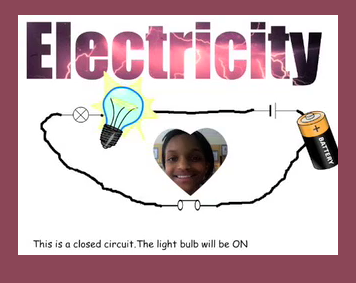
Fourth graders at Laburnum have been learning about electricity and circuits (SOL 4.3b), so we created circuit movies in Pixie. Pixie has some neat features that we used in this project like Cool Word and video transitions. First I gave them a template to get started (you can download it by clicking here). We merged the title and the picture of lightning using Cool Word (instructions are included on the Pixie), then we went to stickers and got the Circuit Stickers. Next the students put the pictures of the light bulb and battery on the correct symbols and connected them all together using the paint brush. They took a picture of themselves using the webcam tool and added that to where the switch was located. Then we made a copy of the closed circuit and changed a few things to make it an open circuit (we changed the switch, darkened the light bulb by gluing it down and using the paint bucket, and made the background gray). Finally, the students recorded their voices and shared the project as a QuickTime movie with a transition of their choice. The projects turned out great! You can take a look at a sample by clicking here.


Tags:


2nd Grade Matter Database

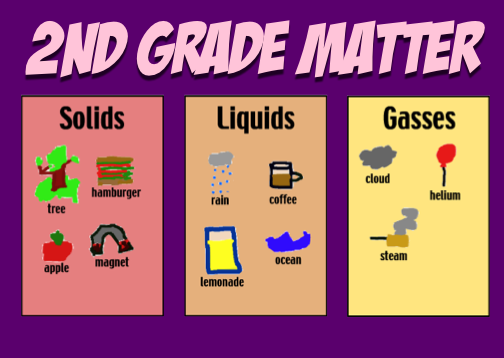
Second graders have been learning about the different states of matter (SOL 2.3) so we created a matter database. First I divided the students up into 3 groups (so not everyone would pick the same type of matter). We had the solids group, the liquids group, and the gases group. Next they drew a picture of their type of matter using Pixie and exported it as a JPG so we could upload it to the database. Then we entered our data into the online form. After everyone finished we took a look at the completed database. I showed the students how to sort the data by different categories. You can sort it by type of matter, teacher name, student name, date, etc. You can also search a database for a specific name or type of matter. We have over 50 records so far… go ahead and add your own to it! Another cool thing you could have your students do is go to this website and sort student-drawn pictures into solids, liquids, and gasses. The pictures were drawn by 2nd grade students in Ms. Roeder’s class. If you’d like to download the folder with all the links click here. And if you’re wondering why we even do databases in elementary school, take a look at this brief (3-minute) video I made explaining the purpose of databases and how to use them in your classroom.


5th Grade Poetry Podcast

Today, fifth graders at Holladay Elementary created poetry podcasts. Before the lesson, each child had chosen a poem they wanted to recite (reciting poetry is a great way to improve reading fluency). So the first thing we did was to go to Pixie and draw a picture for the podcast artwork. Then we exported it as a JPG file, opened a GarageBand podcast project, and dragged the picture into the podcast track. Next I showed them how to record their voices on the vocal track. Finally we added sound effects and music to the Jingles track. The projects turned out great! Take a look at a few examples:
1. Audrey’s poem about the number zero
2. Danielle’s poem about a dog
3. Aaliayh’s poem about bird droppings (she found it in a book!)
4. Jordan’s poem about eating eyeballs (another interesting one!)


1st Grade Goods & Services Database

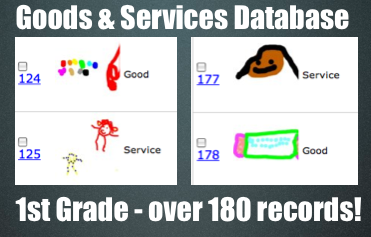
In 1st Grade at Trevvett Elementary we worked on a goods and services database. Students drew pictures of a good and a service in Pixie, then they exported the pictures as JPG files so we could upload them to the online database. Then I sent them to this link to fill out the information and upload their picture. After doing this lesson in several classes we now have over 180 examples of goods and services for you to review with your students! You can sort them different ways (by goods/services, by teacher, by date, by student name) and you can also search them. If you’d like to see all the records you can click this link.


Kindergarten Christmas Counting

Kindergarten students at Holladay have been learning their numbers 1-10. So in keeping with the holiday spirit, we made Christmas counting slideshows with Keynote. I gave them a template to use with clip art from Pixie. It already has all the animations built into it. The students typed the correct number on each slide. While they were working on that, we took their photo in Pixie and pasted it to the first slide with an elf hat. Finally we recorded their voices reading the short sentence on each slide. The final project turned out great! You can see a student example by clicking here. You can download the template to use by clicking here.