Tag: GoogleDocs

1st Grade Time Slideshow
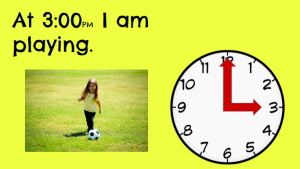
CaptureFirst graders at Holladay Elementary have been learning how to tell time using analog and digital clocks (SOL1.8). Today, we practiced telling time with analog clocks in Ms. French’s class. I gave each student a Google slideshow template that you can copy here. On the first slide, the students typed their names and we discussed what time was shown on the clock. On the other slides they clicked and dragged the correct clock hands to show the times. They could delete the unused hands by clicking on them and pressing the Backspace button (optional). Then they typed a sentence about an activity they would do at that time. I pointed out that the times were all PM so they were in the afternoon or night. I also showed them how to click the image button and search for a picture of the activity by typing it in the box (words like eating, playing, sleeping, etc). After adding photos to each slide, we went back to the first slide and I showed them how to watch their presentation by clicking the “Present” button. You can see a sample slideshow here. UPDATE 3/16/2016 I taught a similar lesson in Ms. Pope’s 1st grade class at Laburnum, except this time we used Storymaker. You can see those samples here.
3rd Grade Time & Matter

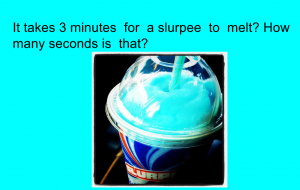
CaptureThird graders at Holladay Elementary have been learning about the states of matter in science (SOL3.3) and equivalent time in math (SOL3.12), so today we created Google slideshows exploring how long it would take for different types of matter to change states in equivalent times. First I made a blank Google slideshow and posted it to Google classroom so every student got a copy. On the cover slide, I showed them how to pick a background image about time using a Google image search. Then we added a title and our names and changed the font, size, and color of the text. Next we added a new slide, and I instructed the students to think of a type of matter that could melt and/or freeze. They wrote a sentence about how long it would take for their matter to change states, and they also wrote a question for their classmates to answer about the equivalent time in another unit (seconds, minutes, hours, etc). They added a picture of their type of matter, and I showed them how to add transitions and animations to the slide. Finally we published them to the web and posted the links on Google classroom so the students could solve each others’ problems. You can see all their slideshows here.


4th Grade Comparing Fractions

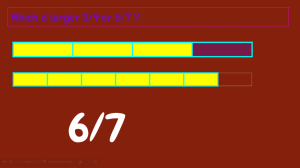
CaptureFourth graders at Varina Elementary have been learning how to compare fractions (SOL4.2a), so today students in Ms. Connell’s class compared fractions using Google slides. I gave them a blank slideshow in Google classroom and showed them how to change the font, size, and color of the title (“Fractions”) and subtitle (their name). Next we added a background image to the title slide. For the second slide, we added a background color instead of an image. The students typed a sentence asking their classmates to tell whether one fraction was greater or less than another fraction. I asked them to pick fractions that were challenging to compare, for example 2/3 and 7/12, instead of simple ones like 1/2 and 1/4 that could easily be compared. We used tables to show the fractions. I taught them how to add a table with the table button and to click and drag across the correct total number of squares (the denominator of the fraction). We used the paint bucket to fill in the number in the numerator. When you add tables to a slide, they are automatically the same size and the squares are equal, so it really worked out well for comparing the fractions (unless the students re-sized them on accident). Next, we added a text box with the answer and used transitions so the answer appeared at the end. Finally, we published our slideshows and pasted the links to Google classroom. You can see them all here.


3rd Grade Estimating Weight of Matter

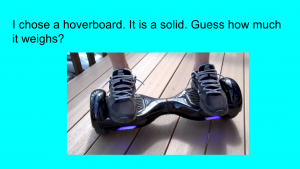
CaptureThird graders at Varina Elementary are learning how to estimate weight in math (SOL3.9c), and they are studying matter in science (SOL3.3) so today students in Ms. Hambrick’s and Ms. Leo’s classes estimated the weights of different types of matter. First I gave them each a copy of a blank Google slideshow template in Google classroom. I explained the concept, that they would pick a type of matter (solid, liquid, or gas) that they were curious about and estimate its weight. Then we would research its actual weight. With that in mind, I instructed the students to find a background image for their title slide that showed matter. They typed a creative title, changed the font, size, and color, and typed their name in the subtitle. Next, we created a new slide with “Title only” and changed the background color. The students typed a sentence about their object, identifying it as a solid, liquid, or gas and wrote a question for their classmates to estimate its weight. We had to discuss the incredible variety of matter all around so they weren’t copying a few ideas (it seemed like everyone wanted to weigh hoverboards and cheetahs). They came up with some good ideas that even got me curious. How much does a tree weigh? How much does the water in a pool weigh? Once they had their estimation slide finished, we made one more with the answer. Students had to do a Google search to find the actual weight of their object, and we discussed reliable and unreliable results. Finally we published the slideshows and posted the links on Google classroom so they could practice estimating weight with each other’s presentations. You can see them all here.


5th Grade Plant Inferences

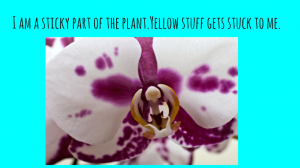
CaptureFifth graders at Varina Elementary have been learning about plants in science (SOL5.5) and they have been making inferences in reading (SOL5.5i). Since solving riddles often involves making inferences, students in Ms. Kirchmier’s class wrote plant riddles for each other to solve. We used Google slides to create the riddles. I gave them a blank template in Google classroom and showed them how to make a title page with a background image. For the second slide, students chose a color background and added a text box with their riddle. I explained that the riddle had to be about a plant part, and it had to make students think. Riddles shouldn’t be too easy to solve. Next students inserted a photo from a Google search and added animations and transitions. Finally they published their slideshows (File > Publish) and posted the links on Google classroom. Students solved each other’s riddles in the comments section. You can see them all here.


2nd Grade American Indian Place Value

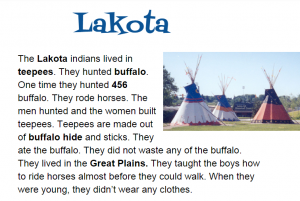
CaptureSecond graders at Holladay Elementary have been learning about the American Indians in Social Studies (SOL2.2) and place value to hundreds in math (SOL2.1). So today Ms. Fournier’s class wrote place value questions about the American Indians for their classmates to solve. I posted an assignment in Google classroom with a blank Google document and made a copy for each student. When they opened their copy, I instructed them to chose an Indian tribe (they had only learned about the Powhatan and the Lakota so far) and to type the name of the tribe for the title. Then we changed the font, size, and color of the title. Next they typed a few facts about their tribe, and one of the facts needed to include a 3-digit number. I also suggested that they make the important words bold, since they’ve been learning about that as a nonfiction text feature (SOL2.9a). Finally I showed them how to insert an image. We published our assignments, copied the links, and posted them to Google classroom with a question for our classmates to answer. They had to identify the ones, tens, or hundreds place of the number in the text. You can take a look at all their stories here.


4th Grade Polls from the Past

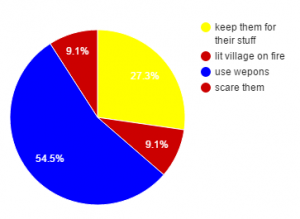
CaptureWith Presidential elections coming up next year, it seems that public opinion polls are popping up everywhere, asking Americans for their views on issues ranging from economics to the environment. Today students in Mr. Cochran’s class created public opinion polls from the past. They are currently learning about the Jamestown colony (VS.3) so they created created polls asking the Jamestown settlers or the Powhatan Indians for their input on different problems they faced. First they had to decide if they were going to poll the settlers or the Indians. Then I showed them how to create a Google form with a multiple choice poll question. We customized our forms by changing the header images and adding photos. Next the students walked around the room and answered each others’ poll questions as if they were a Jamestown settler or a Powhatan Indian. After the voting was finished, I showed them how to view the responses in a spreadsheet. The students graphed the results and posted them to Google classroom. You can see all of them here.


3rd Grade Animated Food Chains

CaptureThird graders at Holladay Elementary have been learning about aquatic and terrestrial food chains in Science (SOL3.5), so today students in Ms. Middleton’s class created animated food chains using Google Slides. First I posted a blank template to Google classroom and set it up to make a copy for each student. We discussed the different habitats they have learned about (rainforest, grasslands, desert, ocean, etc), and I told them to chose one for their food chain diagram. On the first slide, the students clicked the background button and chose an image of their habitat. Then we added the title and their name. I showed them how to change the font, size, and color so it showed up well on the background image. On the second slide we added a sun shape by clicking the Shapes button and changing the fill and outline colors. We double-clicked inside the shape and typed the word “Sun.” Next I showed them how to add the other plants and animals by clicking the Image button and doing a Google search. Under each animal or plant the students added a text box label. We also added curved connectors (Line > Curved connector) with arrows showing the flow of energy to connect the images together. Finally we added animations to each picture so they appeared in order. The students posted their finished slideshows to Google classroom, but you can see them all here.


4th Grade Interactive Word Problems

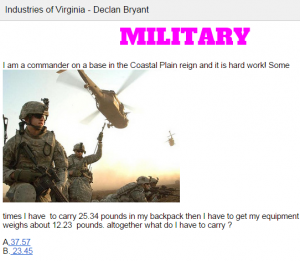
Capture1Fourth graders at Davis Elementary have been learning how to add and subtract decimals in Math (SOL4.5c), and they have been studying Virginia industries in Social Studies (VS.10b). Today I showed them how to use Google Docs to create interactive decimal word problems about the industries of Virginia. First I shared a blank template with them in Google classroom. I reviewed how to add a title and change the font, size, and color. The students chose a region and an industry, then they wrote a word problem that involved adding or subtracting decimals. They also added a photo of the industry (Insert > Image). For the interactive part, we created multiple choice answers that, when clicked, would let the visitor know if they were right or wrong. The process involved using bookmarks and links. First we skipped about 20 lines down the document and wrote a “correct” message, like “You’re right!” Then we skipped about 20 more lines and wrote an “incorrect” message, like “Try again!” We added a bookmark next to the title, the correct message, and the incorrect message (Insert > Bookmark). Next we highlighted each answer choice and turned it into a link by clicking the link button (it has a chain icon) and linked the choices to the correct bookmark. Finally we highlighted the correct and incorrect messages and linked them to the title bookmark so visitors could click them and go back to the top. Take a look at some student examples here.


5th Grade Plot Comics

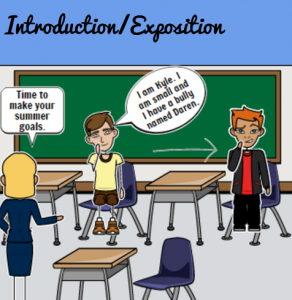
5thcomicFifth graders in Ms. Bailey’s class at Davis Elementary have been learning about plot development (SOL5.5c) as they read the exciting book, Escaping the Giant Wave by Peg Kehret. Today I showed them how to create a Google slideshow highlighting important events in the plot of the story. We used StoryboardThat to illustrate each scene. StoryboardThat includes a variety of backgrounds and characters that can be customized. The students searched for special items they wanted to add to their pictures, like fire and waves. Then we took screenshots of the pictures and imported them into our Google slideshow. Next we added text boxes to each slide identifying the parts of the “plot mountain”: introduction/problem, rising action, climax, falling action, and resolution. I showed them how to change the background color of the slides and add transitions. Finally we published the links to Google classroom where students could view each others’ slideshows and discuss similarities and differences. The featured image is from Sarah’s slideshow, but you can see them all here.