Category: 3rd Grade

3rd Grade Comparing Rules & Laws
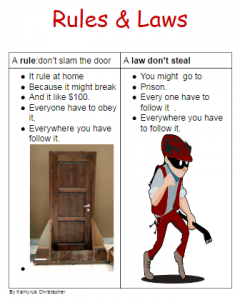
captureThird graders at Trevvett Elementary have been learning about the difference between rules and laws (SOL3.10a). The teachers developed a project as an alternative assessment where the students create posters comparing rules and laws, so today Ms. Hufnell’s students made digital posters using Google docs. Some of the students worked with a partner while others worked individually. First I made copies of a blank Google doc for each student in Google classroom. I showed them how to create a fancy title by changing the font, size, and color. Then we inserted a 2×2 table. In the first row, students wrote the rule and the law that they chose. I showed them how to make the important words bold. In the second row students described the rule and law, and I showed them how to make bullet points. Finally, the students clicked Insert > Image > Search and searched for images that reflected the rule and and law they chose. We published our posters to Google classroom so everyone could see them. You can check out some of their projects here.

3rd Grade Animal Adaptations

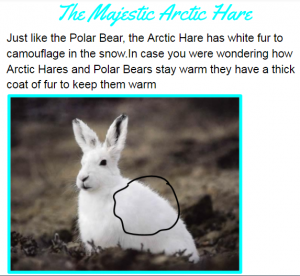
captureThird graders at Varina Elementary have been learning about animal adaptations in Science (SOL3.4) and writing for a variety of purposes in Language Arts (SOL3.9). So today students in Ms. Lanham’s class wrote about animal adaptations using Google docs. This was my first lesson with them, so I wanted to introduce them to Google classroom and the basics of word processing. First I posted a blank Google doc template to Google classroom and set it to make a copy for each student. I instructed them to choose an animal they were curious about and do a bit of research in another tab. A good way to get some quick facts is just to type the name of the animal and “adaptations” into a Google search. We discussed the importance of putting the information in their own words and not plagiarizing. Then we went back to the Google doc and typed a creative title. I showed them how to change the font, size, and color of their title. Next they wrote a few sentences about some of the adaptations their animal had to help it survive. Finally, instead of simply adding a picture of the animal, we clicked Insert > Drawing so we could circle or otherwise point out the various adaptations seen in the image. When they were finished, the students published their writing and posted the links to Google classroom. You can read all their animal reports here.


3rd Grade Ancient Civilizations Maps

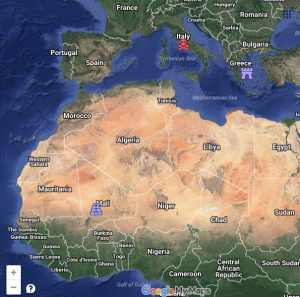
CaptureThird graders at Davis Elementary have been preparing diligently for the upcoming SOL Tests. To help them review their map skills and the ancient civilizations of Greece, Rome, and Mali (SOL3.4), students in Ms. Parkinson’s class created ancient civilization maps using Google maps today. First I posted a link to My Google Maps on Google classroom. Students clicked the “Create a new map” button and typed a title like “3rd Grade Review.” Then we tried to find important landmarks for each civilization without using the “Search” feature. For Greece, we located the Parthenon in Athens, and placed a marker on it. I showed them how to add a picture to the marker and customize the map icon. We placed a similar marker on the Colosseum in Rome and on Timbuktu in Mali. For our last location, I wanted to show them how to create a custom icon, so we found Davis Elementary on the map and placed a marker on it. We clicked the paint bucket > More icons > Custom icon > Webcam and took a photo of ourselves. Then we selected that photo as our marker icon for Davis. Finally we shared our maps to “Anyone with the link” and pasted the links on Google classroom for everyone to see. You can see them all here. Be sure to zoom into each marker to see the actual buildings.


3rd Grade Water Cycle Slideshow

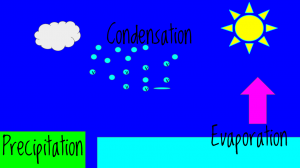
CaptureThird graders at Laburnum Elementary have been learning about the water cycle (SOL3.9), so today students in Ms. Tyler’s class created animated water cycles using Google slides. First we looked at a sample animated water cycle to review. I posted a blank slideshow template in Google classroom and set it to make a copy for each student. On the first slide we clicked the Background button and searched for a good image to represent the water cycle (clouds, ocean, rain, etc). We added a title and our names, changing the font, size, and color to coordinate with the background image. Next, we added a new slide and changed the Background color to a sky blue. We used the shapes tool to place blue and green rectangles at the bottom for the ocean and land. We also used the shapes tool to add an arrow, a sun, a cloud, and a circle for a rain drop. I showed them how to change the border thickness and color of each shape. Once we got the raindrop looking the way we wanted, we copied and pasted it multiple times until we had a bunch of rain drops. Then we grouped them together by dragging across all of them and clicking Arrange > Group. Finally, we added text boxes to label each part of the water cycle (evaporation, condensation, and precipitation). To animate the water cycle, we clicked on the background and then clicked the Transition button at the top. Each object in the picture had to be clicked in the order it was supposed to appear, and we added an animation to it. When the students were finished, they clicked File > Publish to the web and copied the link. We posted them to Google classroom so our classmates could see the, but you can see them here.


3rd Grade Money & Change Comics

CaptureThird graders at Laburnum Elementary have been learning how to count money and make change (SOL3.8), so today students in Ms. Ford’s class created comics about buying things and getting change back. I posted a link to StoryboardThat on Google classroom, and when students opened the website we clicked “Create a Storyboard.” First we looked at the background Scenes and discussed possible places where money is exchanged: grocery store, restaurant, shopping mall, movie theater, school, etc. I explained that their comic would have 3 frames: the first one would be about how much the item costs, the second one would be about how much money the character paid, and in the last frame, a character would ask a question for the students to solve, like, “How much change would I get back?” For the characters, I demonstrated how to customize their colors, costumes, and expressions. I also showed the students how to use the Search box to find additional props, like money and objects to buy. The last step in making the comic was to add the speech bubbles and type complete sentences in each frame about the money story problem. When they were finished, the students took screenshots of their comics and uploaded them to Google classroom for their classmates to solve. You can see some examples here.


3rd Grade Simple Machines

CaptureThird graders at Holladay Elementary have been studying simple machines (SOL3.2), so today students in Ms. Middleton’s and Ms. Edelblut’s classes created animations to show how different simple machines work. I posted a similar lesson a couple of years ago here, but I did a couple of things differently this time that I wanted to share with you. In Ms. Edelblut’s class, we used ABCYa!Animate and added a real photo for the background. First we did a Google image search for a background photo, then on ABCYa! we clicked the “Edit background” button and chose “Import photo.” It added a cool effect to the animations. You can see some student samples here. In Ms. Middleton’s class we used a different site I just discovered called ParaPara. It’s much simpler than ABCYa!Animate, but you have to draw everything, and there is no copy button, so you have to redraw your picture for every frame. For that reason I advised the students to keep their drawings very simple. The final animation isn’t saved as a .gif file either, but you can view them online. Several students were able to make two or three animations! You can see Ms. Middleton’s animations here .


3rd Grade Time & Matter

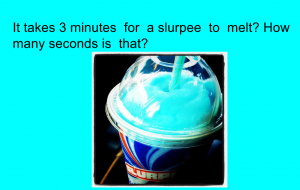
CaptureThird graders at Holladay Elementary have been learning about the states of matter in science (SOL3.3) and equivalent time in math (SOL3.12), so today we created Google slideshows exploring how long it would take for different types of matter to change states in equivalent times. First I made a blank Google slideshow and posted it to Google classroom so every student got a copy. On the cover slide, I showed them how to pick a background image about time using a Google image search. Then we added a title and our names and changed the font, size, and color of the text. Next we added a new slide, and I instructed the students to think of a type of matter that could melt and/or freeze. They wrote a sentence about how long it would take for their matter to change states, and they also wrote a question for their classmates to answer about the equivalent time in another unit (seconds, minutes, hours, etc). They added a picture of their type of matter, and I showed them how to add transitions and animations to the slide. Finally we published them to the web and posted the links on Google classroom so the students could solve each others’ problems. You can see all their slideshows here.


3rd Grade Animated Life Cycles

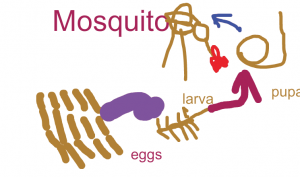
CaptureThird graders at Laburnum Elementary have been studying animal life cycles (SOL3.8b), so today students in Ms. Collins’ class created animated insect life cycles using ABCYa! Animate. We picked insects because many students are very familiar with the butterfly life cycle, but they are not familiar with other insects’ life cycles. First we did some research. The students picked an insect they were curious about (ants, fireflies, mosquitoes, cockroaches, ladybugs, etc) and searched for a life cycle diagram for that specific insect. Next they searched for photographs of each stage in the insect’s life cycle to see what they really looked like. Students were amazed at how bugs looked so different in their larva stages! When our research was finished, I posted the link to ABCYa! Animate on Google classroom. On the first frame of the animation I showed them how to draw a picture of the insect’s eggs and label it “eggs”. We used the copy cat button to copy the picture, and then we added an arrow to it. We copied that picture and added the “larva” stage. We continued copying each picture and adding stages to the life cycle until it was complete. Then we adjusted the speed of our animation and exported it as a .gif file. Finally, we uploaded our animations to Google classroom so everyone could see them. You can see them all here.


3rd Grade Estimating Weight of Matter

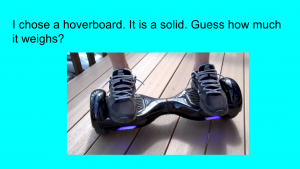
CaptureThird graders at Varina Elementary are learning how to estimate weight in math (SOL3.9c), and they are studying matter in science (SOL3.3) so today students in Ms. Hambrick’s and Ms. Leo’s classes estimated the weights of different types of matter. First I gave them each a copy of a blank Google slideshow template in Google classroom. I explained the concept, that they would pick a type of matter (solid, liquid, or gas) that they were curious about and estimate its weight. Then we would research its actual weight. With that in mind, I instructed the students to find a background image for their title slide that showed matter. They typed a creative title, changed the font, size, and color, and typed their name in the subtitle. Next, we created a new slide with “Title only” and changed the background color. The students typed a sentence about their object, identifying it as a solid, liquid, or gas and wrote a question for their classmates to estimate its weight. We had to discuss the incredible variety of matter all around so they weren’t copying a few ideas (it seemed like everyone wanted to weigh hoverboards and cheetahs). They came up with some good ideas that even got me curious. How much does a tree weigh? How much does the water in a pool weigh? Once they had their estimation slide finished, we made one more with the answer. Students had to do a Google search to find the actual weight of their object, and we discussed reliable and unreliable results. Finally we published the slideshows and posted the links on Google classroom so they could practice estimating weight with each other’s presentations. You can see them all here.


3rd Grade Greece & Rome Nearpod

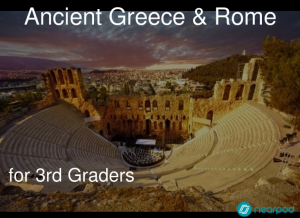
CaptureNearpod is a cool webtool for making interactive presentations that provide live feedback from your students. They can answer your questions, draw or label a picture, take a quiz, vote on a poll, fill-in-the-blank, and more! Ms. Middleton at Holladay Elementary wanted to learn more about it, so today I showed her 3rd graders a Nearpod activity I created about Greece and Rome (SOL3.1). I tried to showcase each feature: it includes (1) a poll about the occupations in ancient Greece and Rome, (2) a 2-question quiz about the building projects of these two civilizations, (3) a fill-in-the-blank activity about the geography, (4) a map students can draw on to locate Greece and Rome, (5) a matching memory test, and (6) a free response question. If you wanted to create your own Nearpod, you would log in with your Google account and click “Create.” Then you would add different slides by clicking the type of activity you wanted. You could also upload a PDF file and each page would become its own slide. When you finish, you click “Publish.” To start a live session with your class you would go to “My Library” and click “Live Lesson” on the slideshow you want to share with them. Nearpod will give you a PIN number for the lesson, and when students go to Nearpod, they just enter the PIN number. They don’t need to log in. Let me know if you’d like me to show Nearpod to your class!