Category: 3rd Grade

3rd Grade Parthenon Perimeter
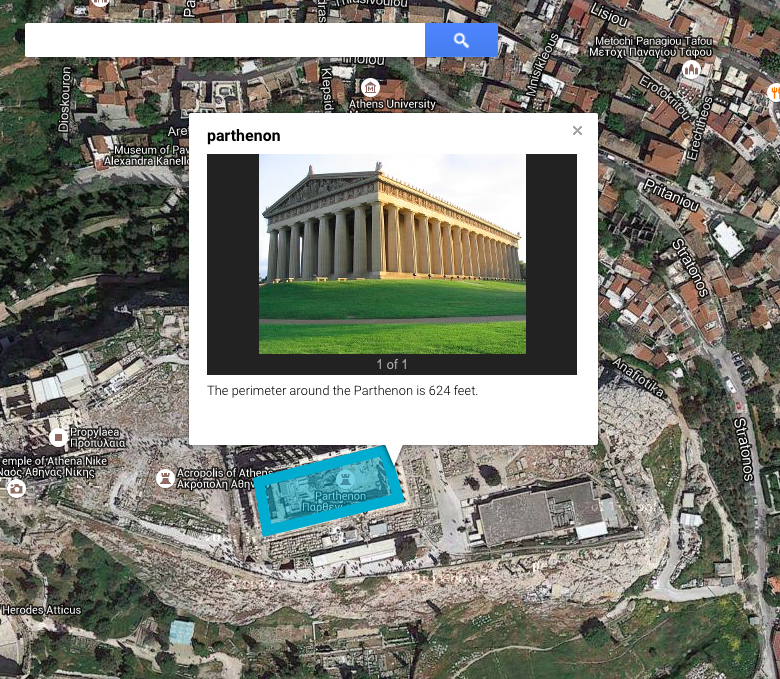
Screen Shot 2015-05-12 at 8.02.58 AMThird graders at Davis Elementary have been learning about the architecture of the ancient Greeks (SOL3.1) and how to identify Greece on a map (SOL3.4). They have also been studying perimeter in math (SOL3.9d). So today students in Ms. Eller’s class found the Parthenon using Google maps and calculated the perimeter of it. First we signed into our Google accounts and went to Google classroom where I posted a link to My Google Maps. The students clicked “Create a Map,” and we talked about where Greece was located. First we found Europe, then we located the Mediterranean Sea. Since the map was labeled, it was easy to find Greece. We zoomed in on Greece, and I instructed them to keep zooming in on the labeled city of Athens. Once they were closer to the city, we started zooming in on a green patch labeled “Acropolis.” Then we switched over to Satellite view (click Base Map in the left menu box). Now we could actually see the Parthenon and its columns! By the way, if you would like to give your class a virtual tour of the Parthenon you could go to it in regular Google maps and drag the yellow peg man from the bottom right tool bar to one of the blue dots that appear near the Parthenon for a Street View panoramic tour of the site! To calculate the perimeter of the Parthenon you could use the ruler tool and measure all the sides, but we used the line tool and drew a rectangle around the Parthenon. I showed them how to change the color and thickness of the shape using the paint bucket that appears next to the shape in the left-hand key. When you click the shape after you’ve saved it, a box pops up that gives you the perimeter. We clicked the pencil on the box to edit it and wrote the perimeter in the description (other people who view the map won’t see the perimeter unless it’s in the description). We also clicked the camera tool to add a photo of the Parthenon. We posted the links to our maps in Google classroom so we could compare our measurements with our classmates’. You can look at some of their maps here.

3rd Grade Ancient Greece Word Problems

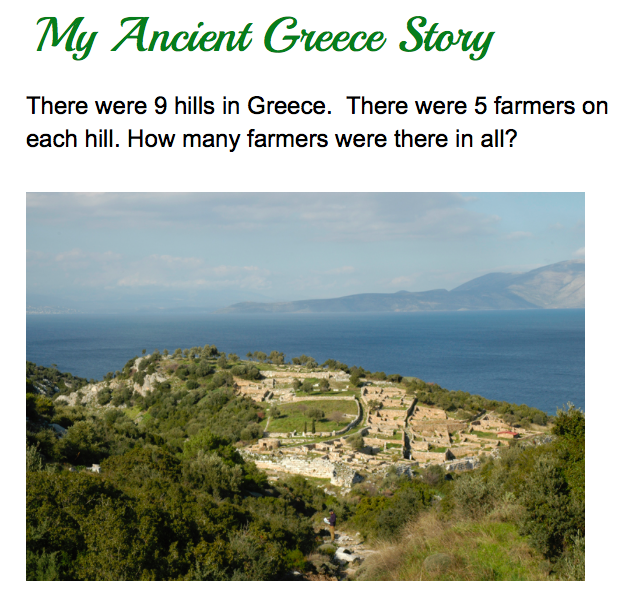
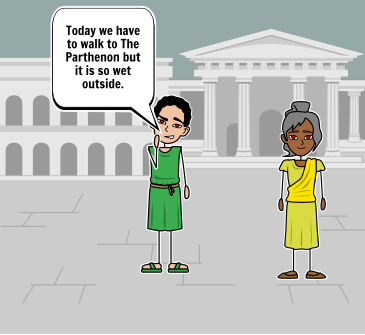
PursellThird graders at Laburnum Elementary have been learning about the contributions and the economy of the ancient Greeks in social studies (SOL3.1, 3.7), and they’ve been learning how to solve multiplication word problems in math (SOL3.6). So today students in Ms. Ford’s class wrote their own ancient Greece multiplication word problems for their classmates to solve. First I created an assignment in Google classroom and gave them a blank Google docs template. Since this was their first time using Google docs, I showed them how to change the font, size, and color of the text. They added a customized title, then we brainstormed ideas for the multiplication problem. We discussed what the land and architecture in ancient Greece were like, and we also considered the different jobs that people in ancient Greece had. I explained that multiplication involves groups of things, so I told them to think about situations in the lives of the ancient Greeks that would include groups (soldiers, Olympics, trading ships, olive and grape orchards, buildings, etc). They typed their questions, then I showed them how to add a picture using the built-in Google image search. We posted the problems to the Google classroom page so the students could solve each others’ problems. You can try solving some yourself here.


3rd Grade Greece & Rome Comics

Screen Shot 2015-05-06 at 3.46.05 PMThird graders at Holladay have been studying ancient Greece & Rome in social studies (SOL3.1,3.4,3.7), and they have been learning about narrative elements such as characters, setting, problem, and solution in language arts (SOL3.5). So today students in Ms. Middleton’s class created Greece & Rome comics that included those narrative elements. First they chose whether to make a comic about ancient Greece or ancient Rome, and I introduced them to a cool website for making comics online called StoryboardThat. Each of them logged in with their Google accounts and chose a blank template with three panels. I explained that the first panel would be the problem, the middle panel would show the characters trying to solve the problem, and the last panel would be the solution. Now the students had to start brainstorming problems that people in ancient Greece or Rome would face. They had lots of good ideas relating to the occupations people had like famines for farmers, storms for traders, and battles for soldiers. Next we discussed what kinds of settings would be appropriate. They pointed out that Greece and Rome had hills, farmland, and both were located near the sea. I showed them how to pick a setting from the Scenes library that would be good for ancient Greece or Rome (HINT: look under the Historical or Outdoor tabs). I also showed them how to find appropriate characters by looking under the Historical tab. Finally I demonstrated how to change the colors and poses for the characters and how to add speech bubbles. The students spent the rest of the time creating their comics with narrative elements. We posted the finished comics to the classroom page, and you can take a look at some of them here.


3rd Grade Descriptive Habitat Maps

Screen Shot 2015-04-29 at 2.55.26 PMThird graders at Varina Elementary have been learning about habitats and ecosystems in science (SOL3.6) and writing good descriptive details in Language Arts (SOL3.9), so today we created descriptive habitat maps in Ms. Wells’ and Ms. Leo’s classes. First we practiced writing descriptive sentences about our weekend, posting our ideas to the Google classroom page. Then I posted a link to My Google Maps and the students clicked the “Create a New Map” button (they were already logged into their Google accounts). We switched the Base Map to Satellite view so we could see the landscape. We discussed how the different colors on the map indicated the habitat–brown for deserts, green for forests, blue for water, and white for ice and snow. Next I showed them how to create markers for the different habitats and instructed them to write a good descriptive sentence about each habitat on the marker. I also showed them how to add a photo by clicking the camera icon. We tried to find pictures with animals that lived in the ecosystems. Finally I taught them how to change the look of their markers to reflect the habitat, like using a sun icon for the desert and a tree icon for the forest. We posted our maps to Google classroom, and I collected both classes’ maps together for you to view here.


3rd Grade Coins & Money

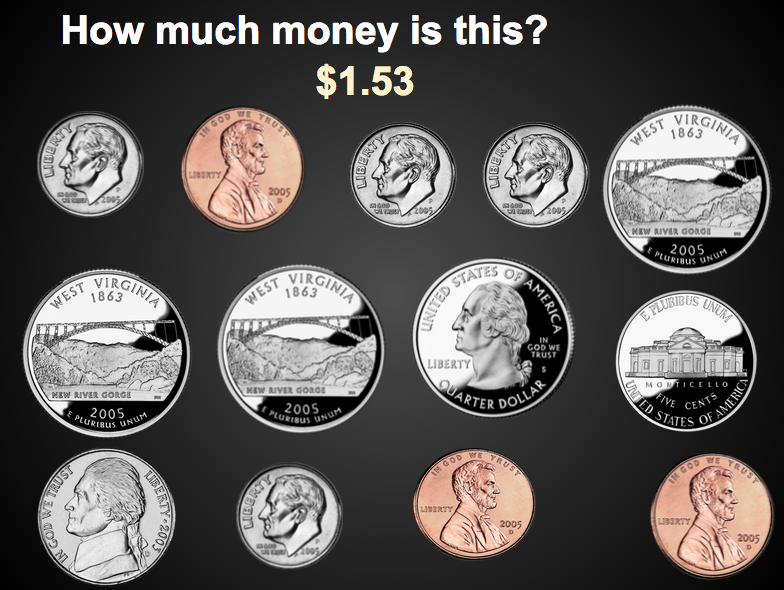
Screen Shot 2015-04-22 at 8.34.56 AMThird graders at Davis Elementary have been learning about coins and money in Math (SOL3.8). Today, students in Ms. Cousins’ class created interactive money problems for their classmates to solve using Google slides. I created a template that you can download here, and I created an assignment in Google classroom, making a copy of the template for each student. When they opened their copy, I showed them how to add their names to the first slide. On the second slide I showed them how to copy, paste and delete the coins so that they had a new, challenging number of coins for their classmates to add up. Then they had to figure out the answer and add it to their slide. I taught them how to change the color of the text and add an animation, so the answer would appear when the viewer clicked on the slide. Finally we posted our slideshow links to the classroom page so we could look at each others’ problems and try to solve them. We also checked to see if our answers matched their answers. You can take a look at all their slideshows here.


3rd Grade Food Chains

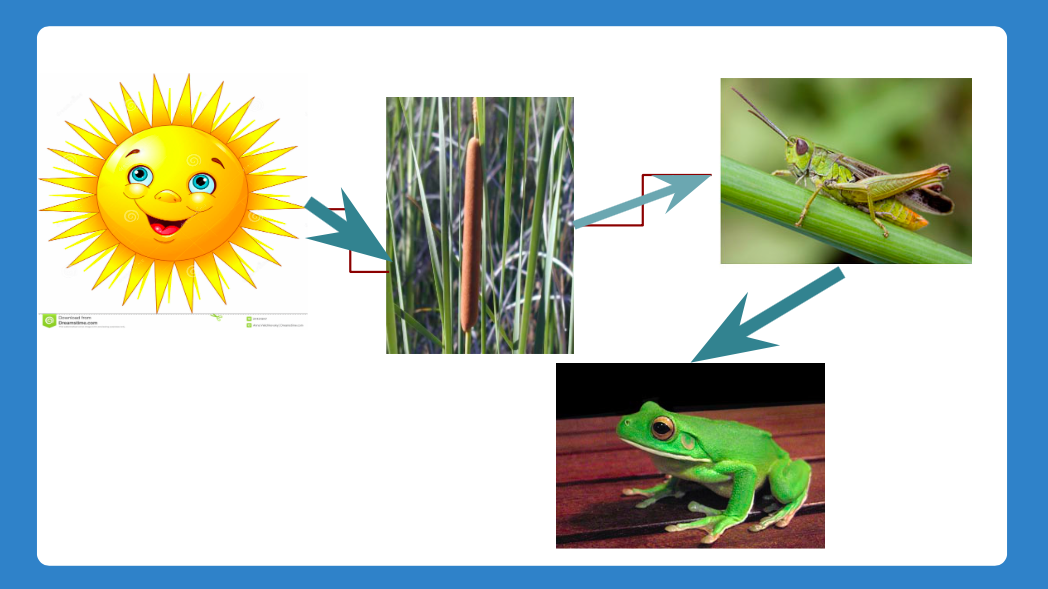
Screen Shot 2015-04-15 at 12.32.41 PMThird graders at Davis Elementary are learning about food chains (SOL3.5) and ecosystems (SOL3.6) so today students in Ms. Eller’s class created animated aquatic and terrestrial food chains using Google slides. First we discussed food chains and how they were the same and different in various ecosystems. All of them start with the sun which gives energy to plants. The plants are different, as well as the animals that eat the plants and each other. The students chose an ecosystem they wanted to research and present. I created an assignment in Google classroom with a blank Google slideshow template. They wrote the type of food chain for the title and their name for the subtitle. I showed them how to create a new slide and use the research tool to find a picture of the sun. Next we found a picture of a plant that lives in the ecosystem (pond, ocean, desert, etc). I taught them how to add an arrow showing the flow of energy from the sun to the plant. We discussed where the next arrow would point (to an animal that eats the plant). The students added additional animal photos and arrows to connect them into a food chain. Finally I showed them how to add animations to make the food chain grow in sequence. We posted the finished slideshows to the classroom page. You can see them all here.


3rd Grade Word Problems

Screen Shot 2015-03-15 at 10.25.03 AMThird graders at Laburnum have been working with word problems, so today Ms. Collins’ class created their own word problems for their classmates to solve. I also got to teach them some word processing skills with Google Docs. First I assigned them a blank document in Google classroom. I showed them how to change the font, size, and color of the title text. Next they wrote an addition or subtraction word problem using larger numbers (2- or 3-digit) to make it challenging for their friends. I taught them how to add a picture using the Insert > Image > Search sequence. They found an image that went along with their word problem. Finally I showed them how to share their document with their classmates by clicking the blue Share button, and then clicking the grey link circle in the window that opened to turn it green. That copied the link which they then pasted to the classroom page. Now they could click “Add a comment” under their friends’ links and type in their answers. You can take a look at some of their word problems here.


Word Sort Spreadsheet

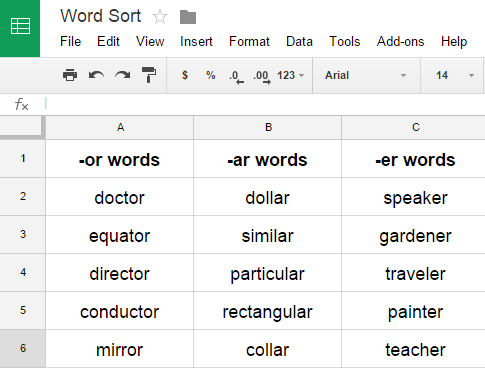
WordSortI’ve been doing lots of spreadsheet lessons this year because most of my schools are focusing on math skills. However, spreadsheets can be used for other things besides math… like word sorts. Most students have to do weekly word sorts, and a spreadsheet is a useful tool for them to keep their word sorts organized. Today I showed some of the 2nd and 3rd grade teachers at Davis Elementary how to do this. Give each student a word sort spreadsheet (you can make a copy of it). If you distribute it using Google classroom, it will automatically be shared with you. Students can do all their word sorts on the same spreadsheet by adding new sheets at the bottom. That makes it very easy for you to manage since you have just one document for each student, and you can access them anytime right in your Google Drive! Students write their column headings at the top, then write the correct words in each category. When it’s time for a new word sort, they would click the arrow in the Sheet tab at the bottom and click Duplicate. They can give their new sheet a name, like Week 3, and delete all the old data by highlighting it and clicking the Backspace key. Now they are ready for a new sort.


3rd Grade Rounding Calculator

3rdRoundingThird graders at Laburnum Elementary have been learning how to round numbers to the nearest ten and hundred (SOL3.1b) so today I showed the students in Ms. Collins’ and Ms. Ford’s classes how to make a rounding calculator. First, for a warm-up activity, we went to Google classroom and I posted an announcement that said, “What is a number that will round to 40?” The students clicked “Add comment” and posted their ideas (any number between 35-44). Next I asked them if they thought computers could round faster than they could. We discussed that even though computers are faster than humans, they aren’t smarter. People have to program computers, and today, I explained, we were going to program the computer to round for us. I gave them a template that you are welcome to copy (a finished sample is on Sheet 2). First they could write whatever 2- or 3-digit numbers they wanted down column A. I told them to try to make it hard for the computer. Next in cell B2 we wrote the rounding formula =ROUND(A2,-1) which rounds the number in cell A1 to the tens place (the -1 means one place to the right of the decimal). Then I showed them how to drag the little blue square in the corner of B2 down through the rest of column B. It automatically rounded all the numbers in column A! Finally I asked them to figure out and test a formula in C2 that would round A2 to the nearest hundred. Many of them realized that it was =ROUND(A2,-2). If you have time, you could go on and write a formula that would round the numbers in column A to the nearest thousand.


3rd Grade Number Patterns

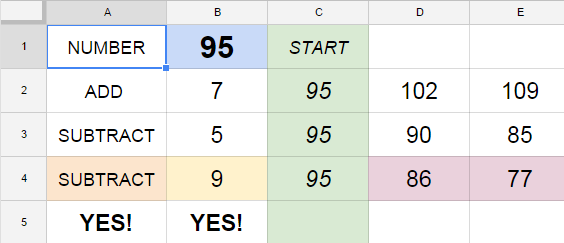
3rdPatternsThird graders at Holladay have been learning about number patterns (SOL3.19) so today I taught them how to create and solve their own number patterns using Google spreadsheets. First I gave them a spreadsheet template that you can copy here. There is a finished sample on Sheet 2 of the template with directions for your reference. The students entered a 2-digit number in the top blue box, and it is automatically entered into the green boxes. Then the students enter a number they want to repeatedly add to it and a number they want to repeatedly subtract from it. The pattern is instantly generated by a formula in the spreadsheet, but I wanted to teach them how to create their own formula. So in the purple cell next to the last green box (C4), they entered whatever pattern they wanted to show, using the basic formula =C4+? or =C4-? I showed them how to drag the tiny blue square in the bottom corner of the box across the other purple cells to create the repeating pattern. Finally they switched seats and tried to figure out each others’ patterns by typing “Add” or “Subtract” in the red box and the number in the orange box. The spreadsheet lets them know if they are right or wrong.